REFERENCE
- Gallery page: https://magpui.com/en/i/magnetic-ports-on-a-node-graph-d3cba1
- First frame (image): https://dnioievkvxejjbxgwvko.supabase.co/storage/v1/object/public/media/magnetic-ports-on-a-node-graph-d3cba1/shot.jpg
- Clip (mp4): https://dnioievkvxejjbxgwvko.supabase.co/storage/v1/object/public/media/magnetic-ports-on-a-node-graph-d3cba1/clip.mp4
- Original post: https://x.com/mrblackstudio/status/2116825570252112336 by @mrblackstudio
Before building, download the first frame and look at it. If ffmpeg is available, download the clip and extract frames (ffmpeg -i clip.mp4 -vf fps=2 frame-%02d.png), then study the motion frame by frame. Match what you see; the text below describes it, the frames are the truth.

BUILD
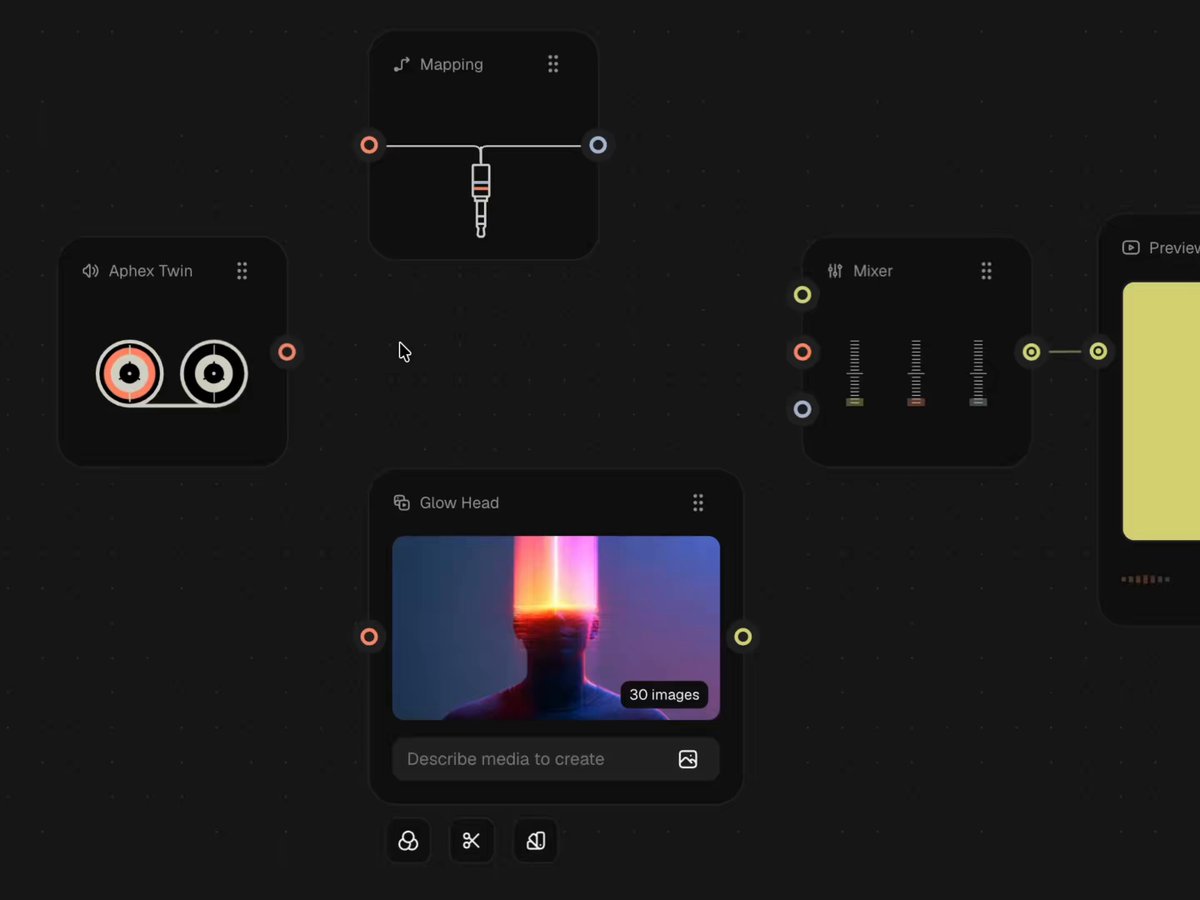
A dark node-graph editor where the wiring itself feels magnetic. Nodes (cards) sit on a dotted canvas, each with round input and output ports on its edges. While you drag a wire, every compatible port in range pulls it in: a translucent halo grows around the closest port, the wire end is attracted toward the port center and snaps on release with a small settle. Cards that are not in play dim, the camera glides to the connection being made, and the final preview node lights up once the chain is complete. It should feel precise, calm and a little playful, like a well-made audio-patch tool.

DESIGN SYSTEM
- Canvas: near-black #161616 with a dot grid, 1.5px dots every 28px at about 6% white. Pannable and zoomable.
- Node cards: fill #111111 to #1a1a1a, 1px border rgba(255,255,255,0.06), radius 22px at full zoom (the cards read as large rounded squares), no visible drop shadow. Header row: 16px monochrome line icon + 15px title in #9a9a9a (medium weight, geometric grotesque or Inter-style sans), and a 6-dot grip handle (2x3 grid of 3px dots, #6f6f6f) on the right.
- Ports: 18px ring with a 2px stroke and a 5px inner dot, sitting in a 36px dark disc (#1b1b1b) that overlaps the card edge. Port colors by data type: coral #F0705A (audio/control), lime-yellow #D7E35A (image/media), periwinkle grey #AEB6D6 (signal). Wires use the color of the type, 2px stroke, cubic bezier curves leaving horizontally from the port; one wire can be drawn as a gentle sine wave (amplitude 4px, wavelength 28px) to suggest a signal.
- Example nodes: Source (cassette/reel icon), Mapping (jack plug icon with a wavy line), Image generator (thumbnail 16:10, radius 10px, small pill badge '30 images', prompt field and a row of 3 tiny icon buttons below), Mixer (3 vertical faders with tick marks, thumbs colored coral, periwinkle, olive-lime, 22x10px radius 3px), Preview (16:10 image or video, dark rounded pause button 44px top right, footer with a 6-bar mini equalizer in gradient lime to coral and a right-aligned stat text '1 branch | 1 media | 8 nodes' in 15px #8a8a8a).

MOTION
- Magnetic halo: when the dragged wire end enters a 56px radius around a compatible port, a circle fades and scales in around that port (0.6 to 1, opacity 0 to 1, 180ms, cubic-bezier(0.22,1,0.36,1)). Fill is the wire color at 22% opacity with a 1px ring at 60%, final diameter about 110px at full zoom. The halo follows the closest port only; moving to another port cross-fades it in 140ms.
- Attraction (Fitts's law): inside the radius the dragged end is pulled toward the port by 35% of the remaining distance plus a spring (stiffness 220, damping 22), so the target effectively grows. On release inside the halo the wire snaps to the port center with a 1.15 overshoot over 240ms and the port ring pulses (scale 1 to 1.25 to 1, 260ms).
- Dim and focus: nodes not connected to the active wire fade to 35% opacity and blur 0 to 1px over 300ms while a connection is being made, and come back after the snap.
- Camera: pan/zoom to the active connection using ease-in-out cubic-bezier(0.65,0,0.35,1) over 700 to 900ms, zoom between 0.6 and 1.4.
- Faders and preview: the mixer thumbs slide by themselves once connected (400ms, same ease), the preview node fades its image in from a glitchy horizontal-scanline distortion over 500ms, and the mini equalizer bars loop at 120 to 200ms offsets.
- The cursor is a normal arrow; no custom cursor.

SECTIONS
Parts: canvas with dot grid, node card (header, body, footer), port with disc, wire, magnetic halo, minimap-free full-bleed layout. States: idle, hovering a port (disc lightens to #242424, ring brightens), dragging a wire, magnetized (halo visible), connected, node dimmed, dragging a node (card lifts with scale 1.02 and a faint shadow).

IMPLEMENTATION
- React with an SVG layer for wires and an HTML layer for node cards inside one CSS-transformed viewport (translate + scale). Wires are SVG paths: M x1 y1 C x1+dx y1, x2-dx y2, x2 y2 with dx = max(60, distance*0.4).
- Pointer events: on pointerdown on a port start a drag, on pointermove find the nearest compatible port within the radius (compare port types, ignore the origin node), compute the magnetized end point, animate the halo and the wire end with Motion springs (or requestAnimationFrame with a critically damped spring). On pointerup connect if a target exists, otherwise let the wire retract in 200ms.
- Keep the graph state in a store (nodes, ports, edges) so wires and halos are derived; animate only transform and opacity, use will-change on the viewport.
- prefers-reduced-motion: no spring or overshoot, halo appears instantly, snap is immediate, camera jumps.
- Keyboard: ports are focusable, Enter on a port starts a connection, arrow keys cycle through compatible ports, Enter confirms, Escape cancels; visible 2px focus ring in the port color.
- Performance: 60fps with up to about 100 nodes, hit-test ports with a spatial grid, not on every node.

ADAPT TO THE PROJECT
Reuse the project's design tokens, fonts, icon set and card components; map the colors above to the closest existing tokens. Never copy logos, brand names, thumbnails or the photograph shown in the original; use placeholder images and your own icons.

SUCCESS CHECK
- Dragging a wire within about 56px of a compatible port shows the halo and visibly pulls the wire end in; releasing connects with a soft overshoot.
- Only the closest compatible port reacts, and unrelated nodes dim while connecting and recover after.
- The graph stays smooth at 60fps while panning, zooming and dragging, and works with the keyboard and with reduced motion.