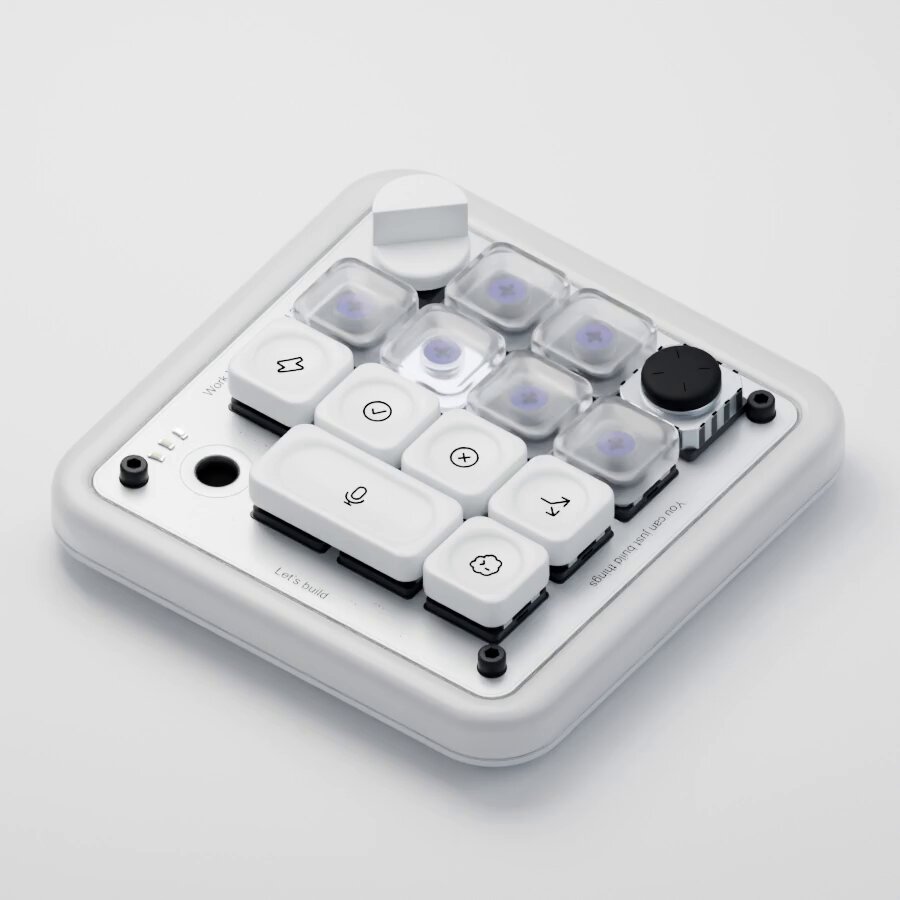
Hit Copy prompt above, open your project in the agent and paste it. The prompt links the original frames, so the agent can look at them before building.
Put the two side by side. If something is off, tell the agent exactly what: timing, size, color or spacing.
REFERENCE
- Gallery page: https://magpui.com/en/i/macro-pad-modeled-from-code-d7a02a
- First frame (image): https://dnioievkvxejjbxgwvko.supabase.co/storage/v1/object/public/media/macro-pad-modeled-from-code-d7a02a/shot.jpg
- Clip (mp4): https://dnioievkvxejjbxgwvko.supabase.co/storage/v1/object/public/media/macro-pad-modeled-from-code-d7a02a/clip.mp4
- Original post: https://x.com/skirano/status/2095595932335170031 by @skirano
Before building, download the first frame and look at it. If ffmpeg is available, download the clip and extract frames (ffmpeg -i clip.mp4 -vf fps=2 frame-%02d.png), then study the motion frame by frame. Match what you see; the text below describes it, the frames are the truth.

3D product render, 4:3, white seamless background. A compact custom macro pad with a white aluminum case, a grid of 16 keys mixing frosted translucent keycaps and black keycaps with purple accents, a rotary knob and a small round button. Isometric three-quarter view, crisp studio lighting, soft contact shadow, realistic materials and small screws. For a code build: model it in Three.js from primitives (rounded boxes, cylinders), with an exploded view animation that lifts keycaps off their switches.