REFERENCE
- Gallery page: https://magpui.com/en/i/live-agent-trace-waterfall-4af810
- First frame (image): https://dnioievkvxejjbxgwvko.supabase.co/storage/v1/object/public/media/live-agent-trace-waterfall-4af810/shot.jpg
- Clip (mp4): https://dnioievkvxejjbxgwvko.supabase.co/storage/v1/object/public/media/live-agent-trace-waterfall-4af810/clip.mp4
- Original post: https://x.com/haaarshsingh/status/2113295780450587049 by @haaarshsingh
Before building, download the first frame and look at it. If ffmpeg is available, download the clip and extract frames (ffmpeg -i clip.mp4 -vf fps=2 frame-%02d.png), then study the motion frame by frame. Match what you see; the text below describes it, the frames are the truth.

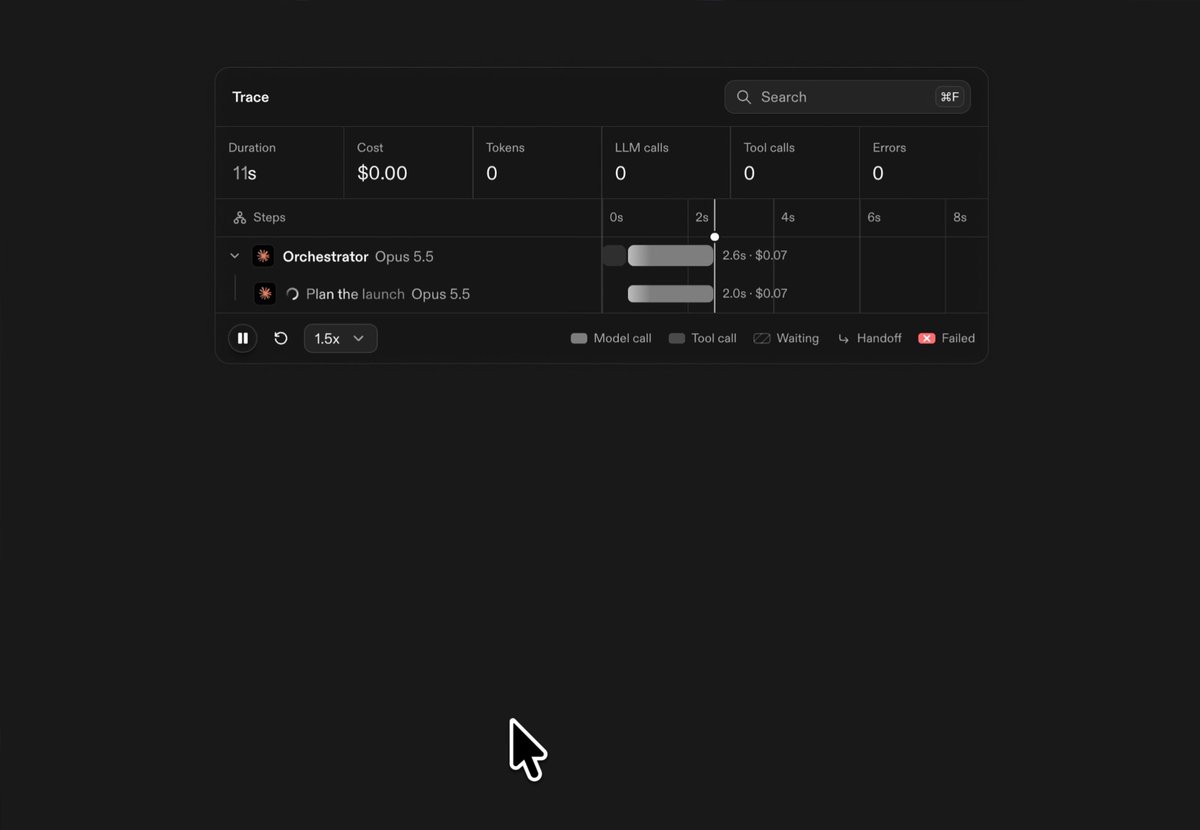
BUILD: Build a compact live execution-trace inspector inside the existing project. Place a hierarchical task tree on the left and a synchronized waterfall timeline on the right. Show agent and tool work as colored horizontal duration bars, connecting parent and child activity with thin elbow lines. Keep the panel dense, quiet and readable while events arrive.
DESIGN SYSTEM: Use a roughly 560px-wide panel on a charcoal #181818 canvas, scaling to available space. Use near-black #111211 surfaces and subtle #292b29 separators. A header contains a small title and rounded search field. Below it, arrange six compact metrics for duration, cost, tokens, calls, spans and errors. Use a neutral sans-serif at 11-13px for rows, 9-10px muted labels, and tabular numbers. Rows are about 24px tall with 12px indentation per tree level. Split tree and timeline around 52/48. Color bars muted gray #a2a6a1, blue #527bad, purple #9a56dc, pink #ed5885 and orange #df983c. Round bar ends by 3px. Render fine vertical time guides and tiny duration labels. Use a faint row highlight under the pointer.
MOTION: On incoming events, reveal a new row with opacity 0 to 1 over 160ms, cubic-bezier(0.2,0,0,1), no stagger. Grow active bars from their start timestamp using elapsed time, not a decorative looping tween. Advance the vertical time indicator with the playback clock. Animate expanded tree rows over 180ms, cubic-bezier(0.2,0,0,1). Hover highlight fades over 100ms. Zoom around the pointer with a 150ms transition using cubic-bezier(0.2,0,0,1); preserve task alignment throughout. Timing values are implementation targets.
SECTIONS: Include title/search header, six summary metrics, expandable nested task labels with small status icons, aligned waterfall bars and dependency connectors, a vertical time cursor, and a compact bottom playback/zoom control strip with color legend. Provide running, paused, selected, collapsed, filtered and completed states. Support selecting a span for a compact inspection popover without replacing the entire panel.
IMPLEMENTATION: Use React with SVG for bars, guides and connectors, and Motion for row expansion and state transitions. Keep labels in accessible DOM elements. Use a shared row model and timestamp-to-pixel scale so the tree and graph never drift. Provide simulated local events without requiring a backend. Batch clock updates in requestAnimationFrame, stop when paused or offscreen, and virtualize beyond 200 rows. Search filters task names while retaining necessary ancestors. Add accessible expand buttons, keyboard span selection, visible focus, labelled playback controls and non-color status cues. With prefers-reduced-motion, immediately insert rows and disable tweened zoom while preserving elapsed-time data.
ADAPT TO THE PROJECT: Reuse the project's existing design tokens, components and fonts. Map these color estimates to the closest existing tokens. Never copy logos, brand names, photos or illustrations from the original; use neutral placeholder task names and simulated data.
SUCCESS CHECK:
- Parent and child rows stay aligned with bars when expanding, filtering and zooming.
- Pausing freezes the clock and active bars; resuming continues without resetting completed spans.
- Search, selection and expansion work by keyboard, and the inspector remains usable at narrow widths with horizontal timeline scrolling.