REFERENCE
- Gallery page: https://magpui.com/en/i/liquid-glass-orb-carousel-7d2efd
- First frame (image): https://dnioievkvxejjbxgwvko.supabase.co/storage/v1/object/public/media/liquid-glass-orb-carousel-7d2efd/shot.jpg
- Clip (mp4): https://dnioievkvxejjbxgwvko.supabase.co/storage/v1/object/public/media/liquid-glass-orb-carousel-7d2efd/clip.mp4
- Original post: https://x.com/imsethidev/status/2114653215405072875 by @imsethidev
Before building, download the first frame and look at it. If ffmpeg is available, download the clip and extract frames (ffmpeg -i clip.mp4 -vf fps=2 frame-%02d.png), then study the motion frame by frame. Match what you see; the text below describes it, the frames are the truth.

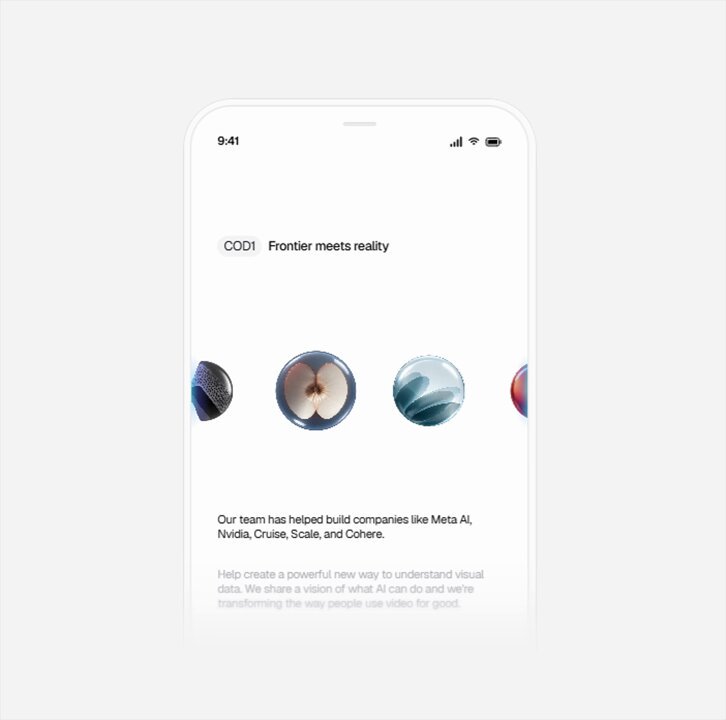
BUILD: Build a horizontal carousel of glossy material orbs for a clean mobile hero. Three orbs are visible: a large one centered and two smaller ones clipped at the left and right edges. Each orb has a different rich material (frosted blue glass, chrome, glossy red, amber glass with an inner diamond, green leaf texture, dark carbon). The carousel auto-advances and can be swiped; as orbs travel they stretch horizontally into teardrop, liquid shapes in the direction of motion, then snap back into perfect spheres when they land, the center one being the largest. It should feel smooth, precious and slightly alive.

DESIGN SYSTEM: White screen #FFFFFF, 390x844 mobile frame. Top-left small tag chip (#F2F2F2, 4px radius, 11px label) followed by a 13px medium headline. Orb row vertically centered around 35% of the screen height: center orb ~96px, side orbs ~56px, 16px gap, edge orbs clipped by the viewport. Below, 13px body copy in #111111 and a second paragraph fading out in #BDBDBD. Orbs have soft reflections, a thin bright rim and a faint ground shadow; no borders.

MOTION: Auto-advance every 1800ms. Each step: orbs translate one slot to the left over 700ms cubic-bezier(0.65,0,0.35,1); scale interpolates between 0.58 and 1 according to distance from center. While moving, each orb stretches along X (up to scaleX 1.6, scaleY 0.8) with a trailing tail, proportional to velocity, then recovers with a slight overshoot of 120ms cubic-bezier(0.34,1.56,0.64,1). New orbs enter from the right edge already stretched. Swipe: drag follows the finger 1:1 with velocity-driven stretch; release snaps to the nearest slot.

SECTIONS: Parts: tag chip and headline, orb track (left, center, right, entering, leaving), body copy. States: idle (subtle breathing scale ±1.5%, slow highlight drift), moving (stretched), settled, dragging.

IMPLEMENTATION: Three.js (or React Three Fiber) with a single orthographic scene: spheres with MeshPhysicalMaterial (transmission for glass, metalness for chrome) or prerendered matcap textures; deform in the vertex shader by stretching vertices behind the motion direction based on a velocity uniform, so the tail lags like liquid. Simpler fallback: SVG/CSS with images of spheres and an SVG goo filter plus scaleX from velocity using Motion. prefers-reduced-motion: no stretch, crossfade between slots. Carousel has prev/next buttons for keyboard, aria-roledescription carousel and pause on hover/focus. Keep under 6 meshes, devicePixelRatio max 2.

ADAPT TO THE PROJECT: Reuse the project's existing design tokens, components and fonts; map every color to the closest existing token. Never copy logos, brand names, photos or illustrations from the original; use placeholders.

SUCCESS CHECK:
- Orbs auto-advance and visibly stretch into liquid shapes while moving, then settle into round spheres.
- Swiping or dragging moves the row with velocity-based stretch and snaps to the nearest orb.
- Reduced motion swaps the stretch for a simple crossfade and the carousel is operable by keyboard.