Hit Copy prompt above, open your project in the agent and paste it. The prompt links the original frames, so the agent can look at them before building.
Put the two side by side. If something is off, tell the agent exactly what: timing, size, color or spacing.
REFERENCE
- Gallery page: https://magpui.com/en/i/kinetic-nested-orange-squares-68a611
- First frame (image): https://dnioievkvxejjbxgwvko.supabase.co/storage/v1/object/public/media/kinetic-nested-orange-squares-68a611/shot.jpg
- Clip (mp4): https://dnioievkvxejjbxgwvko.supabase.co/storage/v1/object/public/media/kinetic-nested-orange-squares-68a611/clip.mp4
- Original post: https://x.com/ayushsoni_io/status/2102334460654236101 by @ayushsoni_io
Before building, download the first frame and look at it. If ffmpeg is available, download the clip and extract frames (ffmpeg -i clip.mp4 -vf fps=2 frame-%02d.png), then study the motion frame by frame. Match what you see; the text below describes it, the frames are the truth.

BUILD
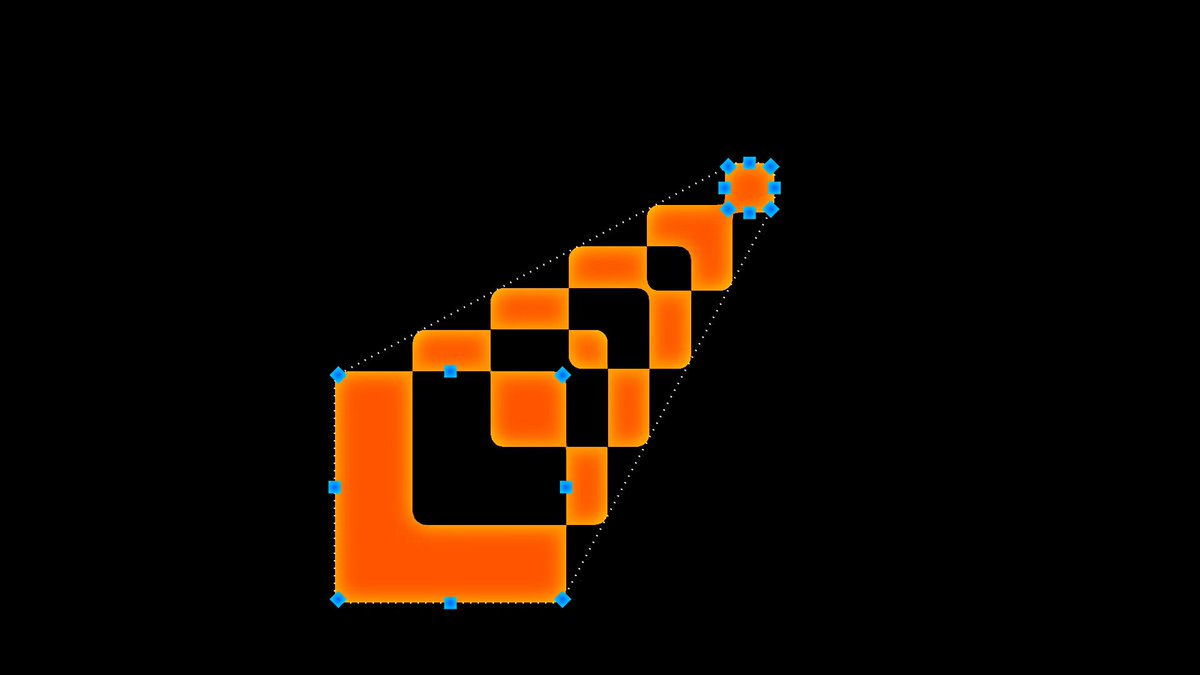
A kinetic mark built from nested squares of decreasing size, aligned at one corner. The squares rotate, slide and fold through several arrangements in a seamless loop.

DESIGN SYSTEM
- Background #000; squares #FF6A00 with 1px #FFA05A inner edge; largest 160px, each next 70% size.

MOTION
- Five poses, 900ms each, cubic-bezier(0.83, 0, 0.17, 1) between them, 40ms stagger from largest to smallest.
- Pose examples: aligned corner, spiral rotate 15deg each, fanned out, collapsed center, mirrored.

SECTIONS
- Single SVG with nested rects.

IMPLEMENTATION
- GSAP timeline with repeat -1; transforms only.
- prefers-reduced-motion: skip the animation and show the end state.

ADAPT TO THE PROJECT
- Reuse the project's existing tokens, components and fonts; map colors to the closest existing tokens.
- Do not copy logos, brand names, characters or artwork from the reference. Use neutral placeholders.

SUCCESS CHECK
- Loop is seamless.
- Squares never overlap in the wrong order.
- Scales cleanly to favicon size as a static mark.