REFERENCE
- Gallery page: https://magpui.com/en/i/glowing-standing-stone-portfolio-6db35e
- First frame (image): https://dnioievkvxejjbxgwvko.supabase.co/storage/v1/object/public/media/glowing-standing-stone-portfolio-6db35e/shot.jpg
- Clip (mp4): https://dnioievkvxejjbxgwvko.supabase.co/storage/v1/object/public/media/glowing-standing-stone-portfolio-6db35e/clip.mp4
- Original post: https://x.com/greensock/status/2117261468743712959 by @guicolombel
Before building, download the first frame and look at it. If ffmpeg is available, download the clip and extract frames (ffmpeg -i clip.mp4 -vf fps=2 frame-%02d.png), then study the motion frame by frame. Match what you see; the text below describes it, the frames are the truth.

BUILD
A one-page portfolio for an interactive developer built around a single 3D object: a tall, rounded, translucent standing stone (like backlit alabaster or rose quartz with soft coloured strata) planted in a wide, misty dusk landscape with low hills, a calm reflective plain and a few bare trees on the horizon. The project list is not a grid: project names are huge white captions that wrap around the base of the stone on an invisible ring, and scrolling rotates the ring so the next name comes to the front while the stone and the whole scene change mood. It should feel quiet, expensive, cinematic and a little mystical, like a museum piece at sunset.

DESIGN SYSTEM
- Full-viewport WebGL canvas behind everything; the stone sits dead center, about 55-60% of the viewport height, its base slightly below the vertical middle.
- UI chrome is tiny: top-left name label 11-12px, top-right 'Menu'/'Close' 11-12px, bottom-left a small row of controls, bottom-right a sound toggle icon 16px; all in #F2EDE8 at 80% opacity, 24px from the edges.
- Project captions: an ultra-bold wide grotesk in caps, 80-110px, line-height 0.85, letter-spacing -0.02em, white #FFFFFF, two lines, centered over the lower third of the stone. Names on the back half of the ring are drawn as outlined or 20% opacity text, curved along the ring, so you read 2-3 neighbours on each side.
- Mood per project (sky, fog, ground, stone tint): 1) dusk red: sky #5A1E1A to #2A0D0C, stone #F08A7A with cream veins; 2) teal night: sky #1F3A40 to #0E1C20, stone cream #E9D7C6 with rust bands #B5543C; keep 4-6 such palettes.
- About overlay: a dark panel (#120B09 at 85%, inset 6% from the viewport, radius 0) with left column copy 15-16px #EDE6E0, line-height 1.45, max-width 520px, then a small two-column awards list (count in 11px #8C7F78, label 11px #CFC6BF, 18px rows), then a row of underlined 12px links. The stone stays visible on the right half.

MOTION
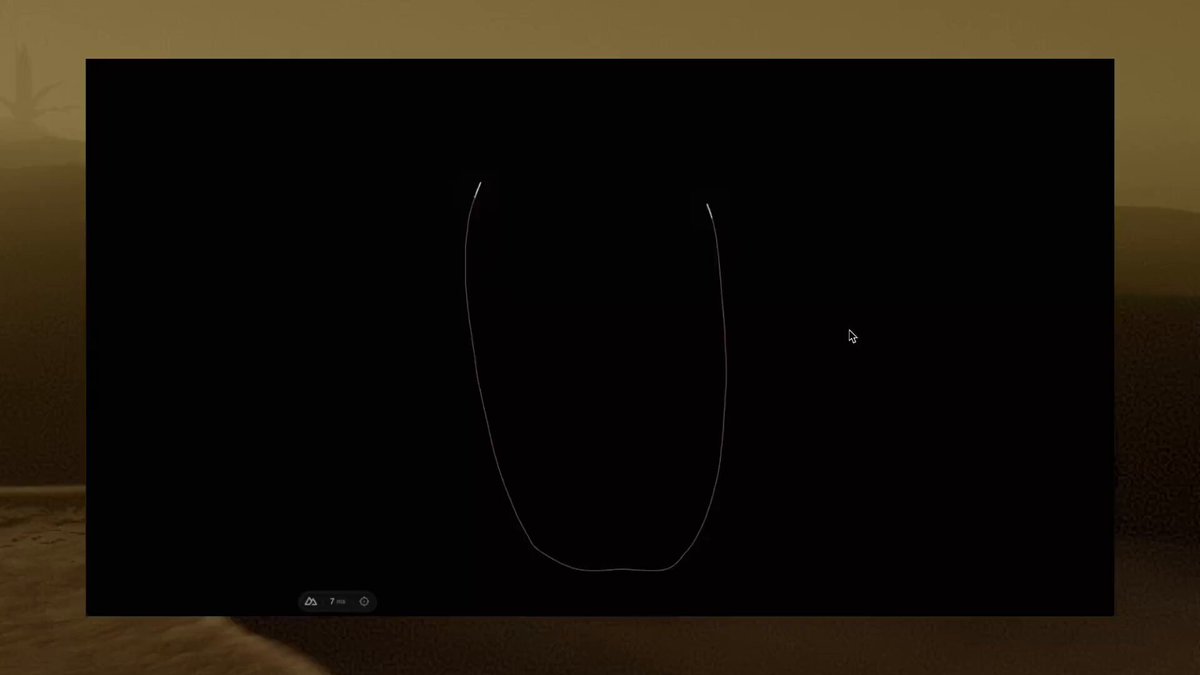
- Intro: black screen, a wireframe version of the stone draws in (thin #FFFFFF lines at 40%), with two or three glitchy rectangular texture tiles flickering over it for ~1.2s, then cross-fade (800ms) into the lit scene.
- Idle: the stone material slowly flows (noise-driven strata scrolling upward, ~30s loop) and breathes in brightness by +-8% on a 4s sine; fog drifts sideways; camera sways +-1.5deg on a 10s loop.
- Cursor light: a soft bright spot (radius ~12% of the stone) follows the cursor inside the stone as if a lamp were moved behind it, lerp 0.08.
- Scroll / wheel: rotates the caption ring one step per project (900ms, cubic-bezier(0.76,0,0.24,1)); the front caption splits into characters that slide up and fade out (stagger 18ms) while the next one rises in; at mid-transition thin bright crack lines flash across the stone for 250ms, then the palette (sky, fog, ground, stone tint) cross-fades over 1100ms.
- Open project: the stone shatters into 8-14 floating shards that fly outward and rotate (1200ms, cubic-bezier(0.16,1,0.3,1)) revealing a dark media plane with the project video; close reverses it.
- Menu: overlay panel fades in 500ms, text lines rise 16px with 40ms stagger; the inner light of the stone moves on its own while the overlay is open.

SECTIONS
1. Intro loader: wireframe stone with glitch tiles.
2. Main scene: stone + landscape + caption ring with the current project name; tiny chrome in the four corners.
3. Project transitions: one palette and caption per project, scroll or drag to rotate.
4. Project open state: shattered stone, media plane, project title and a close button.
5. About overlay: bio paragraph, awards list with counts, social links, sound toggle.

IMPLEMENTATION
- Three.js (WebGPU renderer with WebGL fallback) for the scene: the stone is a displaced capsule/lathe mesh with a custom shader that fakes subsurface scattering (thickness-based transmission + fbm noise strata + a moving point light inside); the landscape is a few layered planes/terrain with height fog and a reflective ground plane.
- Captions: DOM text positioned on a ring by projecting 3D points to screen each frame (or CSS 3D rotateY on a cylinder), split with GSAP SplitText; GSAP timelines drive palette uniforms and ring rotation.
- Shatter: pre-fractured shard meshes (generate a Voronoi fracture offline) swapped in at the start of the open animation.
- Optional ambient audio, off by default with a visible toggle.
- prefers-reduced-motion: no idle flow, no shatter (cross-fade instead), instant ring steps; keep the palette change.
- Keyboard: arrow keys / PageUp/PageDown move between projects, Enter opens, Esc closes; visible focus ring on chrome links.
- Performance: cap DPR at 1.75, single render target for the stone, pause rendering when the tab is hidden.

ADAPT TO THE PROJECT
Reuse the project's existing design tokens, fonts and components; map the palettes to the closest existing tokens; never copy logos, brand names, project names, videos or text from the original, use placeholder project names and media.

SUCCESS CHECK
- Scrolling one notch brings the next project name to the front of the ring and the stone, sky and ground change colour together.
- Moving the cursor over the stone moves a soft glowing light inside it.
- Opening a project shatters the stone into shards and closing it rebuilds the stone.