REFERENCE
- Gallery page: https://magpui.com/en/i/glowing-spotlight-mobile-tab-bar-b67a6a
- First frame (image): https://dnioievkvxejjbxgwvko.supabase.co/storage/v1/object/public/media/glowing-spotlight-mobile-tab-bar-b67a6a/shot.jpg
- Clip (mp4): https://dnioievkvxejjbxgwvko.supabase.co/storage/v1/object/public/media/glowing-spotlight-mobile-tab-bar-b67a6a/clip.mp4
- Original post: https://x.com/abhishekbariyaa/status/2116402284749897877 by @abhishekbariyaa
Before building, download the first frame and look at it. If ffmpeg is available, download the clip and extract frames (ffmpeg -i clip.mp4 -vf fps=2 frame-%02d.png), then study the motion frame by frame. Match what you see; the text below describes it, the frames are the truth.

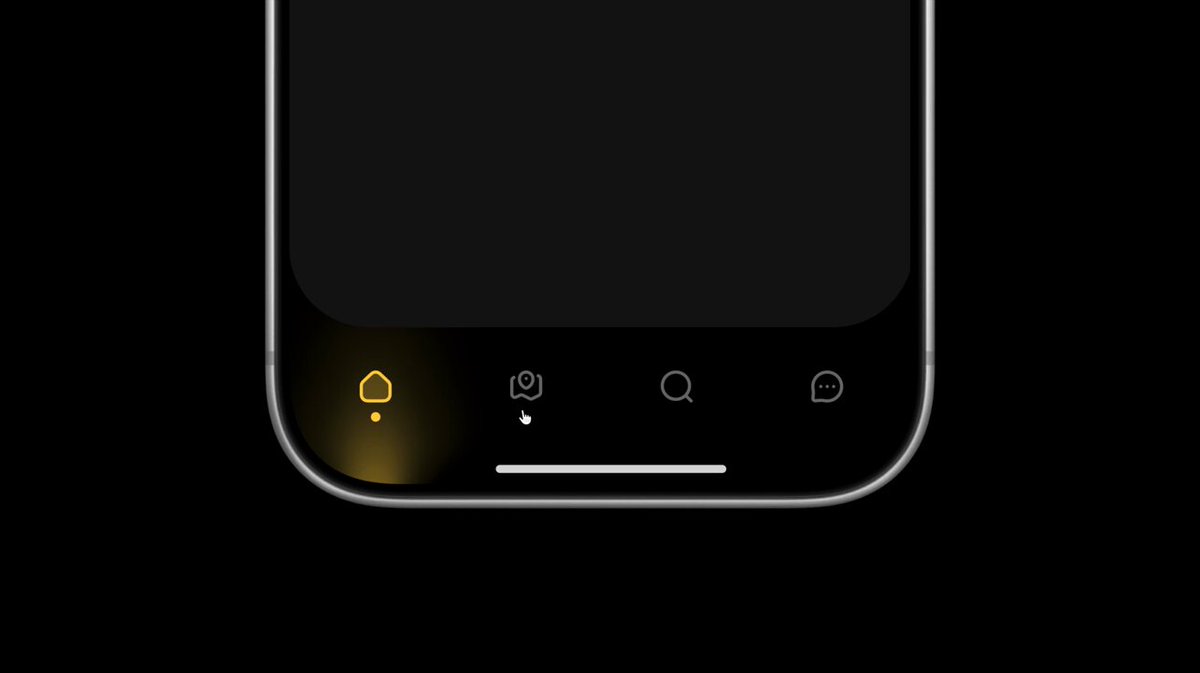
BUILD: A bottom tab bar for a dark mobile app with four outline icons (home, map pin, search, chat). The active tab lights up in its own accent color: the icon stroke turns that color, a small dot sits under it, and a soft vertical beam of colored light rises from the bottom edge of the screen behind the icon, like a stage spotlight shining upward. Tapping another tab makes the dot glide horizontally to the new tab while changing color, the old beam fades out and the new one blooms in. It should feel quiet, precise and a little magical, like neon under glass.

DESIGN SYSTEM: Phone width 390px, bar height about 84px including the home indicator area, background #000000 with the content area above in #1a1a1a ending in large 40px bottom corners. Four tabs evenly distributed, icons 24px, 1.75px outline stroke, inactive color #6b6b6b. Accent per tab: home amber #f5c542, map mint #3fe0b0, search violet #c65cf0, chat red #ff4d5e. Active dot 5px circle in the accent color, 8px below the icon. Beam: a vertical gradient about 64px wide and 70px tall anchored to the bottom edge under the active icon, accent color at 55% opacity at the bottom fading to transparent at the top, with a horizontal radial falloff so the sides are soft (blur about 12px). Home indicator 134x5px pill, #e5e5e5, 3px radius, centered 8px above the bottom.

MOTION: (1) Tab change: dot translates on X to the new tab over 420ms cubic-bezier(0.65, 0, 0.35, 1), its color interpolates from the old accent to the new one over the same time. (2) Old beam: opacity 1 to 0 and scaleY 1 to 0.6 from the bottom, 260ms cubic-bezier(0.4, 0, 1, 1). (3) New beam: starts after 120ms, opacity 0 to 1 and scaleY 0.4 to 1 from the bottom origin, 480ms cubic-bezier(0.22, 1, 0.36, 1). (4) Icon: stroke color crossfades from #6b6b6b to the accent over 240ms, with a tiny scale pop 1 to 1.08 to 1, 300ms cubic-bezier(0.34, 1.56, 0.64, 1). (5) Idle: the active beam breathes very gently, opacity 0.85 to 1 over 2400ms ease-in-out, looping.

SECTIONS: Parts: content area (rounded bottom), tab bar, four tab buttons (icon + label for screen readers), moving active dot, per-tab light beam, home indicator. States: idle, hover/press (inactive icon brightens to #a0a0a0, pressed scale 0.94), active, transitioning.

IMPLEMENTATION: React with Motion: one shared dot element with layout animation (layoutId) or an animated x value computed from the active index, and one beam per tab rendered as an absolutely positioned div with a linear-gradient plus filter blur, toggled with AnimatePresence. Use transform and opacity only, no layout properties, and keep blur on a small element for 60fps on phones. Semantics: nav with role tablist or a list of links, aria-current on the active tab, visible 2px focus ring in the accent color for keyboard users, arrow keys move between tabs. prefers-reduced-motion: no dot travel or beam scaling, just crossfade colors in 150ms.

ADAPT TO THE PROJECT: Reuse the project's existing design tokens, icon set, components and fonts; map the four accents to the closest existing tokens (or define them as tab-level tokens). Never copy logos, brand names, photos or illustrations from the original; use placeholders.

SUCCESS CHECK:
- Tapping a tab makes the dot glide to it while changing color, and a colored beam rises behind the new icon as the old one fades.
- Each tab keeps its own accent color for icon, dot and beam.
- The bar works with keyboard and screen readers, and reduced motion turns the transition into a simple crossfade.