REFERENCE
- Gallery page: https://magpui.com/en/i/glass-shapes-that-shatter-on-drop-7f9042
- First frame (image): https://dnioievkvxejjbxgwvko.supabase.co/storage/v1/object/public/media/glass-shapes-that-shatter-on-drop-7f9042/shot.jpg
- Clip (mp4): https://dnioievkvxejjbxgwvko.supabase.co/storage/v1/object/public/media/glass-shapes-that-shatter-on-drop-7f9042/clip.mp4
- Original post: https://x.com/mrdoob/status/2117623520595521706 by @mrdoob
Before building, download the first frame and look at it. If ffmpeg is available, download the clip and extract frames (ffmpeg -i clip.mp4 -vf fps=2 frame-%02d.png), then study the motion frame by frame. Match what you see; the text below describes it, the frames are the truth.

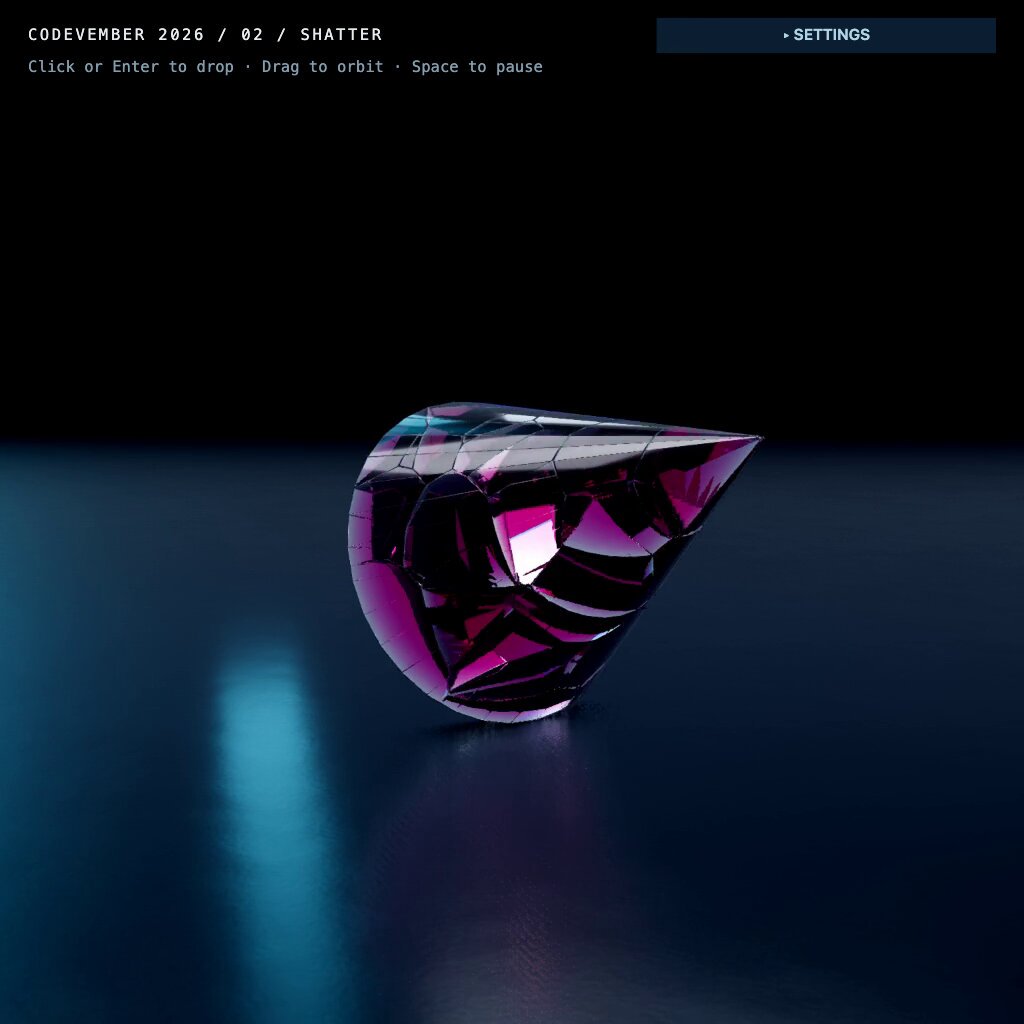
BUILD: A full-screen interactive 3D scene: on a dark, glossy floor, each click (or Enter) drops a colored glass primitive (cone, cube, sphere, cylinder) from above. When it hits the floor it fractures into dozens of irregular convex shards that bounce, tumble and settle into a growing pile, each shard still refracting light like thick tinted glass. Drag orbits the camera, Space pauses the simulation. It should feel heavy, satisfying and jewel-like.

DESIGN SYSTEM: Background near-black #030814 fading into a deep navy floor #0B1C2C. The floor is a large plane with a blurred, slightly rough reflection (roughness about 0.35) and two soft cyan light strips #3FB6D9 reflected in it, like studio softboxes off-screen. Glass: transmissive physical material, thickness about 0.6, IOR 1.5, low roughness 0.05, strong colored attenuation; each drop picks a hue from magenta #D23C9A, emerald #23C46B, cobalt #2A47D6, crimson #E0304F. Small UI overlay top-left in a monospace font, 14px uppercase title with letter-spacing 0.12em in #E6EDF5 and a 12px hint line in #8AA0B5; a compact settings toggle top-right (navy #0F2235 button, 11px bold label).

MOTION: Drop: spawn the primitive 6-8 units above the floor with a small random rotation and angular velocity, fall under gravity 9.8. On first contact above a speed threshold, replace it with precomputed Voronoi fracture pieces (30-60 shards) that inherit the body's velocity plus a small outward impulse (1-3 units/s) from the impact point. Shards bounce with restitution about 0.25, friction 0.6, and come to rest in about 1.5-2.5s. Camera: slow idle auto-orbit about 4 deg/s when not dragged, damped orbit controls (damping 0.08) on drag. Optional: old shards fade and are removed after the pile passes about 400 pieces.

SECTIONS: Parts: canvas scene (floor, lights, environment), glass primitive spawner, fracture and physics step, overlay title and hints, settings panel (shard count, gravity, glass color, reset). States: empty floor, falling, shattering, settled pile, paused (Space), settings open.

IMPLEMENTATION: Three.js (WebGPU renderer with WebGL fallback) with MeshPhysicalMaterial transmission for the glass and a small HDR environment for reflections; a rigid-body physics engine with convex hulls (Rapier, cannon-es or a similar JS physics library) for the shards. Precompute fracture geometry per primitive (Voronoi split with random seeds inside the bounding volume, then convex hulls) so the break costs nothing at impact time. Use instancing per shard geometry where possible, cap device pixel ratio at 2, and limit active bodies (sleep resting shards). prefers-reduced-motion: no auto-orbit, and drops place an already shattered pile with a short fade instead of falling. Keyboard: Enter drops, Space pauses, R resets; expose a status line for screen readers ("Glass dropped", "Paused").

ADAPT TO THE PROJECT: Reuse the project's existing design tokens, fonts and components for the overlay and settings; map the colors to the closest existing tokens. Never copy logos, brand names or text from the original; use placeholders.

SUCCESS CHECK:
- Each click drops a new tinted glass shape that breaks on impact into many shards which bounce and settle on the floor with believable physics.
- Shards keep a refractive, colored glass look and the floor shows soft reflections.
- Drag orbits, Space pauses, and the scene stays smooth (about 60fps) with a few hundred shards on a laptop.