REFERENCE
- Gallery page: https://magpui.com/en/i/five-step-progress-player-d35333
- First frame (image): https://dnioievkvxejjbxgwvko.supabase.co/storage/v1/object/public/media/five-step-progress-player-d35333/shot.jpg
- Clip (mp4): https://dnioievkvxejjbxgwvko.supabase.co/storage/v1/object/public/media/five-step-progress-player-d35333/clip.mp4
- Original post: https://www.rareui.com/components/stepplayer by Rare UI
Before building, download the first frame and look at it. If ffmpeg is available, download the clip and extract frames (ffmpeg -i clip.mp4 -vf fps=2 frame-%02d.png), then study the motion frame by frame. Match what you see; the text below describes it, the frames are the truth.

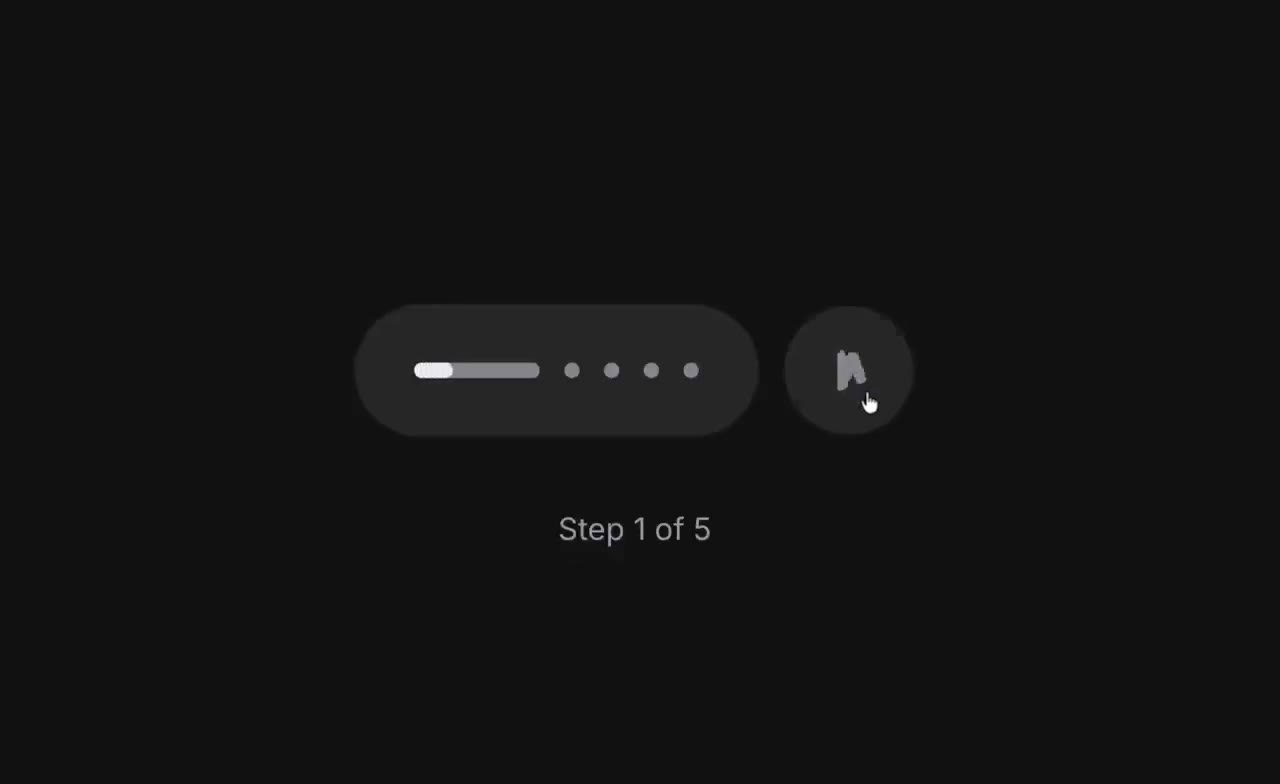
BUILD: Build a compact five-step autoplay indicator, not a complete page. Place a horizontal capsule of progress markers beside a separate circular playback control, with a small step count below. It should feel quiet and tactile.
DESIGN SYSTEM: Use an approximately 160 by 52px capsule and a 52px circular button with a 10px gap. Background #111111, controls #292929, inactive markers #777777, active fill #EEEEEE. Four inactive markers are 6px circles; the active marker becomes a roughly 48 by 6px rounded track. Use a neutral sans-serif, 12px #999999 for the centered step label, 28px below the controls. Keep surfaces flat and fully rounded.
MOTION: Suggested rebuild timing: on active-step change, expand its marker from 6px to 48px and collapse the previous marker over 260ms with cubic-bezier(0.22,1,0.36,1). Fill the active track left to right over 2500ms with cubic-bezier(0,0,1,1), then advance. Pause freezes both elapsed time and fill. On final completion replace pause with a circular replay arrow using a 140ms opacity transition, cubic-bezier(0.2,0,0,1). Replay returns to the first step. These are implementation targets, not measured source timings.
SECTIONS: Five markers in one capsule; separate pause/play/replay button; Step N of 5 label. Support initial playing, paused, arbitrary selected step, fifth-step completion and replay states. The final frame should retain a full fifth marker until replay.
IMPLEMENTATION: Use React state and Motion for marker width and icon transitions, with elapsed-time tracking for progress. Use inline SVG icons and no image assets. Animate the fill using transform scaleX with a left origin. Make markers real labeled buttons and playback keyboard accessible, with visible focus rings. Announce step changes politely, not every animation tick. For prefers-reduced-motion remove morphing and timed autoplay, keeping manual step selection. Clean up timers and avoid background loops when unmounted.
ADAPT TO THE PROJECT: Reuse existing tokens, components and fonts. Map colors to the closest existing tokens. Never copy logos, brand names, photos or illustrations; use placeholders where needed.
SUCCESS CHECK:
- Exactly one of five markers is expanded at any time.
- Pause and resume preserve progress; completion exposes replay.
- Keyboard navigation and reduced-motion mode work without autoplay.