REFERENCE
- Gallery page: https://magpui.com/en/i/explore-a-layered-miniature-harbour-20071e
- First frame (image): https://dnioievkvxejjbxgwvko.supabase.co/storage/v1/object/public/media/explore-a-layered-miniature-harbour-20071e/shot.jpg
- Clip (mp4): https://dnioievkvxejjbxgwvko.supabase.co/storage/v1/object/public/media/explore-a-layered-miniature-harbour-20071e/clip.mp4
- Original post: https://x.com/rewind02/status/2121627795566567577 by @rewind02
Before building, download the first frame and look at it. If ffmpeg is available, download the clip and extract frames (ffmpeg -i clip.mp4 -vf fps=2 frame-%02d.png), then study the motion frame by frame. Match what you see; the text below describes it, the frames are the truth.

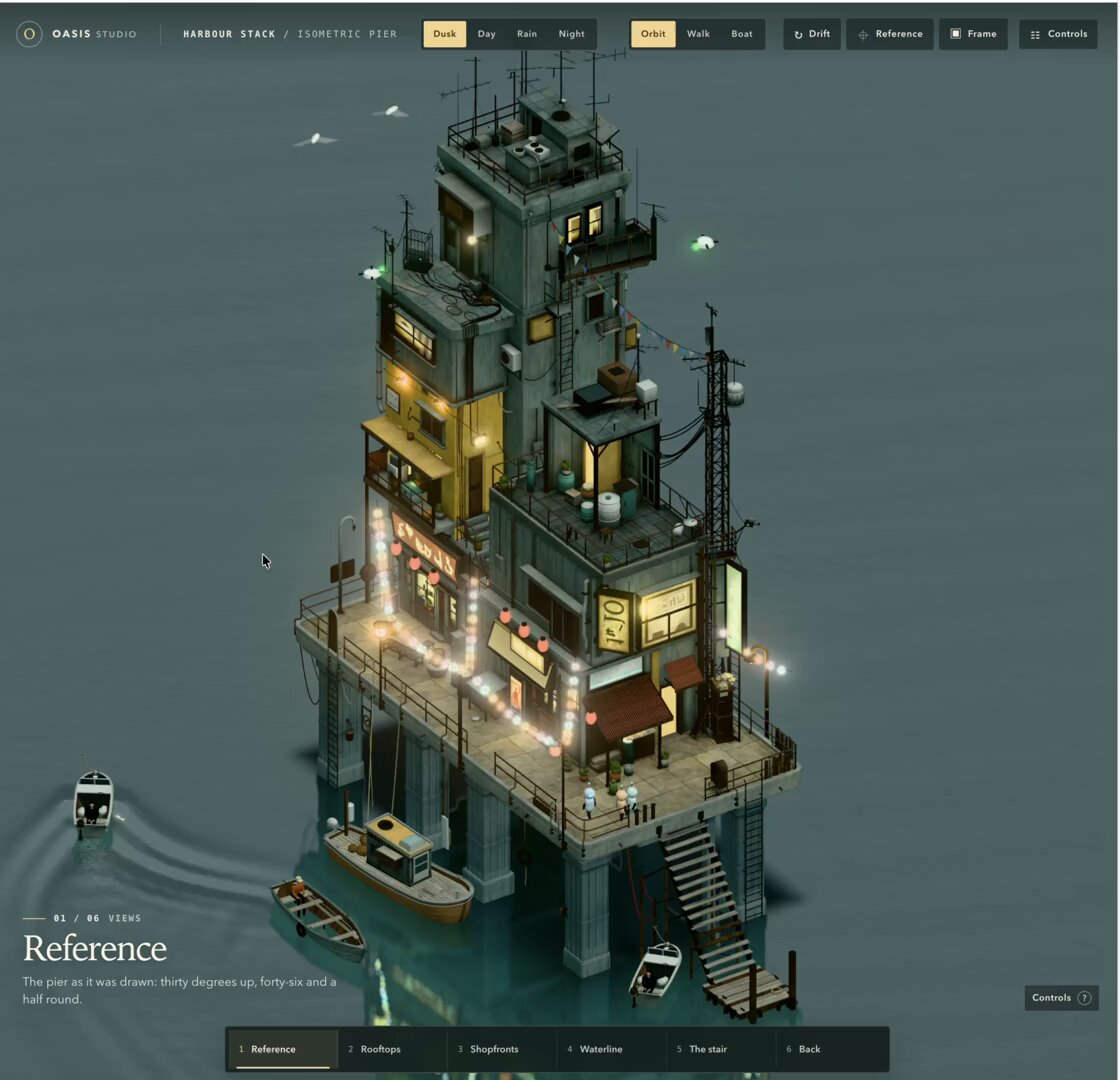
BUILD: Build an interactive miniature harbour: an asymmetrical cluster of narrow stacked buildings perched on a rectangular pier with tall stilts, exterior stairs and small boats. Frame it from an elevated three-quarter reference camera and allow visitors to orbit and zoom around the diorama.
DESIGN SYSTEM: Full-viewport muted teal-grey environment #506963, olive-green building surfaces #39483d, timber decks #88765b and warm emissive windows #ffda78. The tower occupies about 65–80% of viewport height with empty water around it. Model staggered box-shaped floors, balconies, awnings, rooftop railings, antennas, hanging cables and string lights; a long staircase descends to the water. Keep details chunky and readable at distance. Add compact dark controls at the top with pale-yellow active buttons, 10–12px sans-serif labels, 4–8px gaps and 2–4px radii; a restrained serif caption sits bottom left.
MOTION: Drag to orbit with damping and a stable target; wheel or pinch to dolly between overview and facade-detail distances. Camera presets interpolate position and target over 900ms using cubic-bezier(0.22,1,0.36,1). Boats move slowly around the pier, with curved wakes fading over approximately 1800ms. Water ripples continuously at low amplitude. Birds drift on looping paths. Keep lamps steady. Environment presets interpolate sky, lighting and water color over 1200ms with cubic-bezier(0.4,0,0.2,1). These timings are rebuild targets, not measured original values.
SECTIONS: Main canvas containing water plane, stilt-supported pier, stacked buildings, exterior stairs, docked and moving boats, overhead lights and birds. Compact camera and environment controls; default elevated reference view and orbit mode. Optional walk or boat modes require explicit enter and exit controls. Include idle, dragging, zooming, transitioning and reduced-motion states.
IMPLEMENTATION: Model modular low-poly buildings in Blender, export compressed GLB and load it with Three.js. Share materials, use restrained bloom for lamps, soft contact shadows and a lightweight water shader. Instance repeated details, clamp pixel ratio to 1.5–2 and pause offscreen rendering. Use native accessible buttons with visible focus, keyboard orbit and reset. Respect prefers-reduced-motion by stopping ambient boats, birds and automatic movement while retaining direct controls. Provide a static fallback without WebGL.
ADAPT TO THE PROJECT: Reuse existing project tokens, components and fonts; map colors to the closest tokens. Never copy logos, brand names, photos or illustrations from the original. Use an original fictional harbour layout and placeholder signage.
SUCCESS CHECK:
- Default framing clearly shows the tower, pier stilts, stairs and water without clipping.
- Orbit, zoom and reset work with pointer, touch and keyboard without scroll trapping.
- Warm lights remain readable at overview scale and reduced-motion stops ambient animation without blocking exploration.