REFERENCE
- Gallery page: https://magpui.com/en/i/expanding-segmented-permission-toggle-4eb625
- First frame (image): https://dnioievkvxejjbxgwvko.supabase.co/storage/v1/object/public/media/expanding-segmented-permission-toggle-4eb625/shot.jpg
- Clip (mp4): https://dnioievkvxejjbxgwvko.supabase.co/storage/v1/object/public/media/expanding-segmented-permission-toggle-4eb625/clip.mp4
- Original post: https://x.com/nonzeroexitcode/status/2111100136713793619 by @nonzeroexitcode
Before building, download the first frame and look at it. If ffmpeg is available, download the clip and extract frames (ffmpeg -i clip.mp4 -vf fps=2 frame-%02d.png), then study the motion frame by frame. Match what you see; the text below describes it, the frames are the truth.

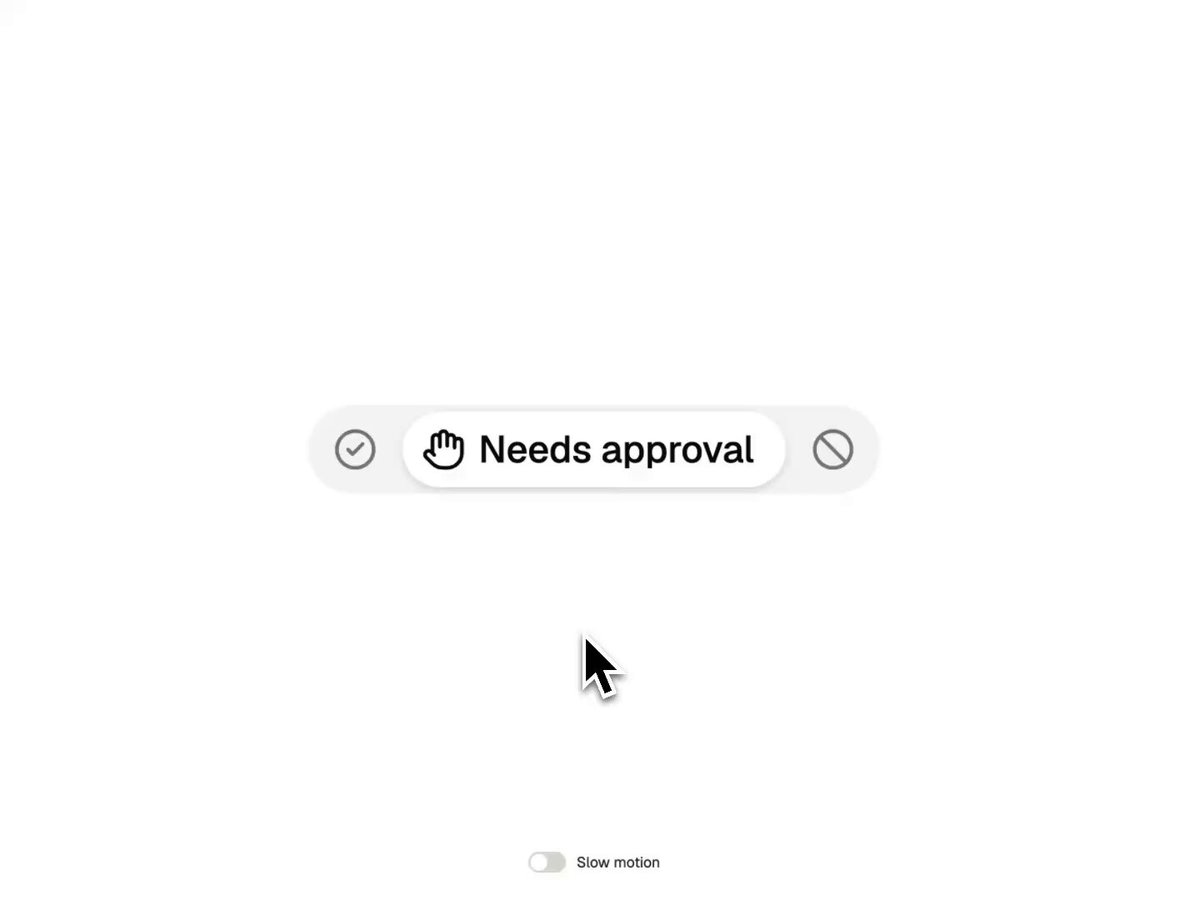
BUILD: A three-option segmented control for an agent's permission level: Always allow (check-circle icon), Needs approval (raised hand icon), Deny (slashed circle icon). Only the selected option shows icon + label inside a white pill; the other two collapse to bare icons. Clicking another icon makes the white pill glide and stretch to it while the old label shrinks away and the new label unfolds. It should feel snappy, compact and physical.

DESIGN SYSTEM: Track: height 36px, padding 3px, radius 999px, fill #F2F2F2, no border. Active pill: white #FFFFFF, radius 999px, height 30px, padding 0 12px 0 10px, shadow 0 1px 2px rgba(0,0,0,0.08), 0 2px 6px rgba(0,0,0,0.06). Inactive segments: 30x30px icon buttons. Icons: 18px line icons, 1.75px stroke; active icon #111111, inactive #8A8A8A. Label: neutral grotesk sans, 15px, weight 500, #111111, 6px gap after the icon, no wrapping.

MOTION:
- Selection change: the white pill animates x position and width to the new segment with a spring (stiffness 500, damping 38, mass 1, roughly 300ms; CSS fallback 300ms cubic-bezier(0.32,0.72,0,1)). Total control width also changes since labels differ; animate it with the same spring so neighbours slide, not jump.
- Outgoing label: opacity 1->0, filter blur(0)->blur(4px), width collapses to 0 over 200ms cubic-bezier(0.4,0,1,1).
- Incoming label: width 0->auto, opacity 0->1, blur(4px)->blur(0) over 260ms cubic-bezier(0.22,1,0.36,1), delay 60ms.
- Icon color crossfades #8A8A8A <-> #111111 over 150ms ease-out.
- Press: active-to-be icon scales to 0.92 on pointerdown, back to 1 on release over 150ms.
- Optional demo-only Slow motion switch that multiplies all durations by 5.

SECTIONS: Parts: track, sliding white pill, three segments (icon + collapsible label). States: idle (one option selected), hover on inactive icon (icon goes #444444, track behind it #EAEAEA), pressed (scale 0.92), transitioning (pill moving, labels blurring), focused (2px focus ring offset 2px around the segment).

IMPLEMENTATION: React + Motion (framer-motion): a shared layoutId pill behind the active segment and layout animation on each segment so width changes spring; AnimatePresence for the labels. Use role="radiogroup" with three role="radio" buttons, aria-checked, roving tabindex, Left/Right arrows to move selection, aria-label on each icon segment so collapsed options are still named. prefers-reduced-motion: no spring, no blur; switch instantly with a 100ms opacity fade on labels. Performance: animate transform/opacity/filter where possible, layout animation is fine for this one small element.

ADAPT TO THE PROJECT: Reuse the project's existing design tokens, components, icon set and fonts; map colors to the closest existing tokens (surface, muted surface, foreground, muted foreground). Never copy logos, brand names or illustrations from the original; use placeholder labels for your own permission levels.

SUCCESS CHECK:
- Clicking any icon moves the white pill to it with a spring, and only the selected option shows a label.
- The whole control resizes smoothly with no jump or text wrapping during the transition.
- The control works with keyboard arrows, has visible focus, and is announced as a radio group with three named options.