REFERENCE
- Gallery page: https://magpui.com/en/i/emoji-picker-on-a-spinning-globe-129e9c
- First frame (image): https://dnioievkvxejjbxgwvko.supabase.co/storage/v1/object/public/media/emoji-picker-on-a-spinning-globe-129e9c/shot.jpg
- Clip (mp4): https://dnioievkvxejjbxgwvko.supabase.co/storage/v1/object/public/media/emoji-picker-on-a-spinning-globe-129e9c/clip.mp4
- Original post: https://x.com/jh3yy/status/2116321049851908266 by @jh3yy
Before building, download the first frame and look at it. If ffmpeg is available, download the clip and extract frames (ffmpeg -i clip.mp4 -vf fps=2 frame-%02d.png), then study the motion frame by frame. Match what you see; the text below describes it, the frames are the truth.

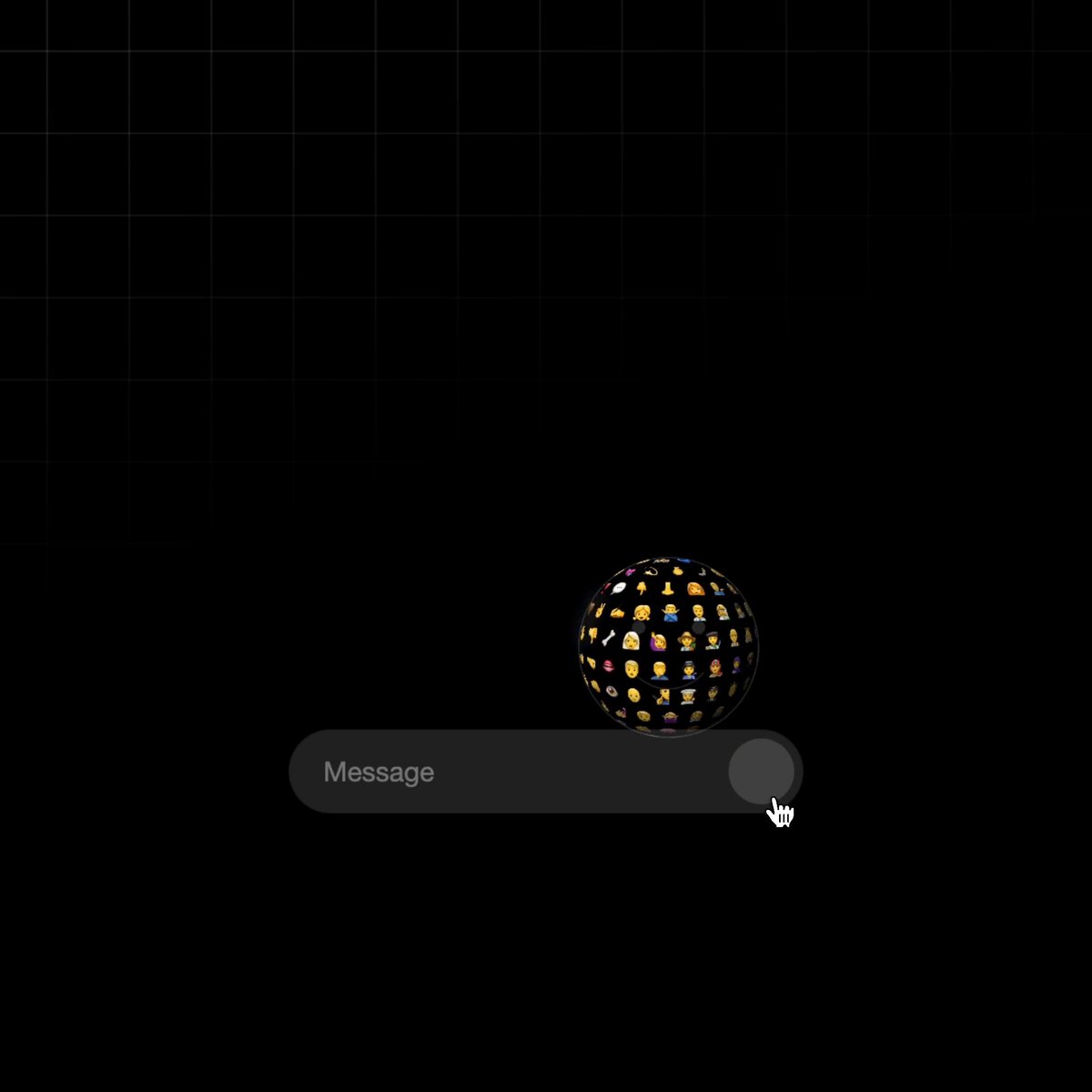
BUILD: Build an emoji picker shaped like a globe. Next to a chat message field sits a small smiley button; pressing it pops a 3D sphere covered in emoji above the field. Scrolling spins the globe on two axes (vertical scroll turns it around its horizontal axis, horizontal scroll around its vertical axis), the most used emoji sit on the equator so they face you first, and emoji fade and shrink as they curve away toward the edges. A small curved search pill hugs the top-left of the sphere. Clicking an emoji drops it into the message field. It should feel tactile and fun, like spinning a desk globe.

DESIGN SYSTEM: Black page (#000) with a very faint 64px grid (#0d0d0d lines). Message field: 320x40px pill, background #1f1f1f, radius 20px, placeholder "Message" in #8a8a8a at 14px system sans, smiley icon button 28px circle (#3a3a3a) on the right. Globe: ~240px diameter, centered ~110px above the field, emoji at ~22px on a lat/long lattice (about 12 rows x 24 columns), spacing even on the surface. Search pill: 110x30px, rotated -40deg to follow the sphere curve, background rgba(40,60,90,.55) with a 1.5px #5b7fb8 border, radius 15px, magnifier icon + "Search" in #cfd8e6 12px; while searching it shows the query plus a counter like "3 of 12". Match highlight: 30px rounded square, 1.5px #6b8fd6 border, background rgba(80,120,200,.25). Scroll hint arrows: 22px square buttons with 1px #444 border bottom-center.

MOTION: Open: globe scales 0.6 to 1 and fades in, 420ms cubic-bezier(.34,1.56,.64,1); emoji pop in with a 6ms stagger from the equator outward. Spin: scroll delta maps to rotateX / rotateY of the sphere with inertia (friction ~0.92 per frame) and a gentle idle drift of 4deg/s. Depth: each emoji's opacity = mix(.15, 1, facing), scale = mix(.55, 1, facing) where facing is the dot product with the camera. Search: non-matching emoji dim to opacity .12 over 250ms ease-out; arrow keys or the up/down buttons rotate the globe to the next match over 600ms cubic-bezier(.22,1,.36,1) and the highlight square morphs onto it. Pick: the chosen emoji lifts (scale 1.4) then flies on a 450ms arc to the caret in the field, cubic-bezier(.5,0,.2,1), and the globe closes (scale to .8, fade, 250ms).

SECTIONS: Parts: message field, smiley trigger, globe, emoji cells, curved search pill with counter, match highlight, next/previous match buttons. States: closed, opening, idle drift, spinning, searching (matches lit, rest dimmed), match focused, picked (emoji flying), closed with emoji inserted.

IMPLEMENTATION: Pure CSS 3D is enough: a preserve-3d container with each emoji placed by rotateY(lon) rotateX(lat) translateZ(r), and the container rotation driven by CSS scroll-driven animations (two scroll timelines, one per axis, inside an overflow container) with a JS fallback (pointer/wheel to CSS variables) where animation-timeline is unsupported. Compute facing per cell in JS only on fallback; otherwise approximate with backface-visibility and a radial mask for edge fade. Cap at ~300 emoji, use will-change on the container only. prefers-reduced-motion: show a flat scrollable grid with the same search. Keyboard: the trigger is a button with aria-expanded, arrow keys move between emoji (globe rotates to follow), Enter inserts, Escape closes; each emoji has an aria-label with its name; visible 2px focus ring.

ADAPT TO THE PROJECT: Reuse the project's existing design tokens, components and fonts, map colors to the closest existing tokens, and use the platform emoji font or the project's emoji set. Never copy logos or brand names from the original; use placeholders.

SUCCESS CHECK:
- Scrolling vertically and horizontally spins the globe on two axes, most used emoji start on the equator facing you.
- Typing in search dims non-matches and the next/previous controls rotate the globe to each match with a counter.
- Picking an emoji flies it into the message field and the picker closes; reduced motion shows a flat grid.