REFERENCE
- Gallery page: https://magpui.com/en/i/dark-workspace-with-connected-cards-b14f46
- First frame (image): https://dnioievkvxejjbxgwvko.supabase.co/storage/v1/object/public/media/dark-workspace-with-connected-cards-b14f46/shot.jpg
- Clip (mp4): https://dnioievkvxejjbxgwvko.supabase.co/storage/v1/object/public/media/dark-workspace-with-connected-cards-b14f46/clip.mp4
- Original post: https://x.com/seanaiux/status/2122375393537892646 by @seanaiux
Before building, download the first frame and look at it. If ffmpeg is available, download the clip and extract frames (ffmpeg -i clip.mp4 -vf fps=2 frame-%02d.png), then study the motion frame by frame. Match what you see; the text below describes it, the frames are the truth.

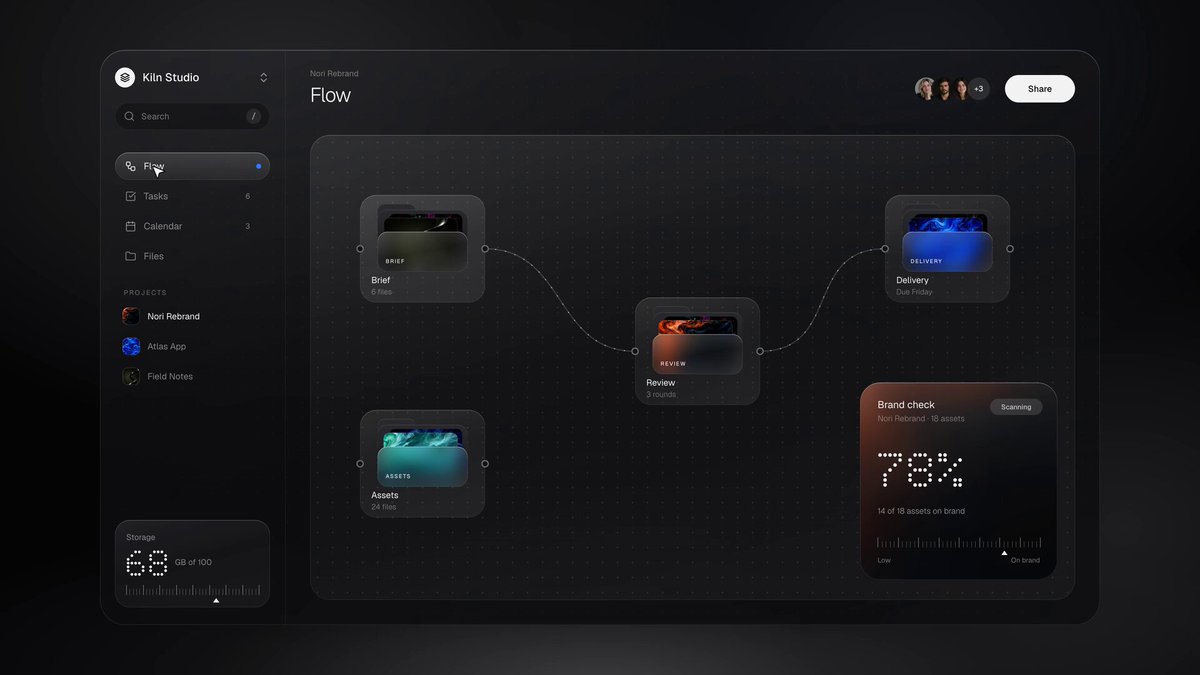
BUILD: Create a compact dark project workspace with a persistent left sidebar and four views: connected project flow, task list, calendar and files. Rebuild the visible workspace and its navigation, not surrounding presentation framing.
DESIGN SYSTEM: Use a near-black #131415 shell, charcoal #1D1E20 panels and muted #929498 secondary text. Estimate a 160px sidebar within a 1100px-wide desktop app; a 56px header contains the view title, small avatar placeholders and a white Share pill. Main panels use 12px radii, 1px #303133 borders and sparse soft shadows. Use a neutral sans-serif, approximately 12px utility text, 14px body and 18px view headings. Small preview tiles introduce restrained blue, cyan and orange accents.
MOTION: On sidebar selection, crossfade and shift the main view upward by 6px over an estimated 220ms with cubic-bezier(0.22,1,0.36,1). Preserve sidebar position and active-row highlight. In the flow view, clicking a card connection highlights its curved connector and updates the small percentage summary; interpolate a path stroke over 350ms and the numeric value over 450ms. Calendar selection highlights a blue event and reveals a compact bottom detail bar over 200ms. Timings are implementation estimates, not measured source values. Avoid adding decorative camera motion.
SECTIONS: Sidebar with workspace identity, search, four main navigation rows, a short project group and a bottom metric card. Flow view: four compact image-preview nodes on a large dark canvas, thin curved connections and a lower-right progress card. Tasks view: a wide grouped task list and narrow summary column with a prominent percentage. Calendar view: a spacious week grid with sparse rounded event blocks and selected blue event. Files view: four preview cards across the top and a simple filename table beneath. Header remains consistent in all views.
IMPLEMENTATION: React with Motion for short view crossfades and SVG for flow connectors. Use local illustrative data, CSS gradient preview placeholders and generic avatar circles, not source imagery or brand assets. Keep node coordinates responsive inside a scrollable canvas; avoid unnecessary pan or drag features not visible in the reference. Make navigation buttons and event/task rows keyboard accessible, indicate the current view with aria-current and supply readable focus rings. With prefers-reduced-motion disable transforms and number interpolation. Keep file actions inert demo controls unless the project supplies real functionality.
ADAPT TO THE PROJECT: Reuse existing tokens, fonts, sidebar and table components. Map estimated colors to the host theme. Never copy logos, brand names, photos or illustrations from the original; use neutral placeholders.
SUCCESS CHECK:
- Four views share the same sidebar, header and consistent spacing.
- Flow connectors, selected calendar event and file table remain clear without decorative motion.
- Keyboard access, reduced motion and narrow layouts work without content clipping.