REFERENCE
- Gallery page: https://magpui.com/en/i/context-window-as-a-treemap-b842ce
- First frame (image): https://dnioievkvxejjbxgwvko.supabase.co/storage/v1/object/public/media/context-window-as-a-treemap-b842ce/shot.jpg
- Clip (mp4): https://dnioievkvxejjbxgwvko.supabase.co/storage/v1/object/public/media/context-window-as-a-treemap-b842ce/clip.mp4
- Original post: https://x.com/flohoeller/status/2113915401495351697 by @flohoeller
Before building, download the first frame and look at it. If ffmpeg is available, download the clip and extract frames (ffmpeg -i clip.mp4 -vf fps=2 frame-%02d.png), then study the motion frame by frame. Match what you see; the text below describes it, the frames are the truth.

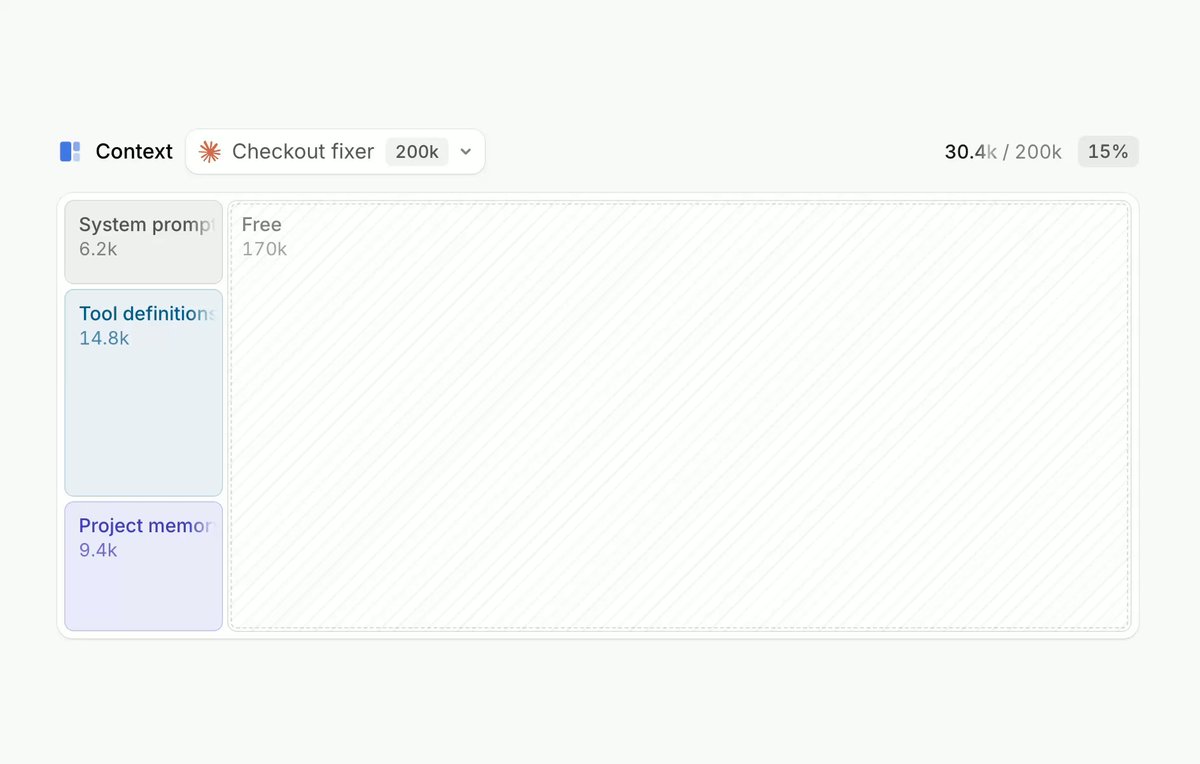
BUILD: Build a compact agent context inspector: a treemap showing token usage by system instructions, tools, files and chat, with a large unfilled remainder and a switcher for agent presets.
DESIGN SYSTEM: Use a roughly 640 by 250px responsive panel, white surface, fine #e5e7eb outlines, 4px corners and 3px gaps. Small neutral sans-serif labels around 11-13px. Category fills are pale blue #e9effc, lavender #eee9fa, warm cream #fff1df and gray #f3f4f4; primary text #333840. Above the map place a small title, compact agent selector and capacity badge on the left, used/total and percent on the right. Keep the free region almost white.
MOTION: On dataset changes interpolate rectangle position and size over a suggested 450ms with cubic-bezier(0.22,1,0.36,1). Fade labels over 150ms. On hover or focus show an anchored white popover over 120ms with cubic-bezier(0.2,0,0,1); do not resize the map for tooltips.
SECTIONS: Header with agent dropdown and totals; treemap with labeled category and file rectangles; file tooltip showing name and token share; tool popover with a compact two-column list; agent menu with several capacity presets. Update the layout and totals when the selected dataset changes.
IMPLEMENTATION: Use a deterministic treemap layout and Motion layout transitions with stable keys. Use pointer and focus handlers for popovers and a keyboard-accessible select/menu. Skip layout interpolation with prefers-reduced-motion. Cap the visible tree to about 40 rectangles and group smaller nodes. Preserve a text summary for screen readers.
ADAPT TO THE PROJECT: Reuse existing design tokens, components and fonts. Map colors to the nearest existing tokens. Never copy source logos, brand names, photos or illustrations; use placeholders.
SUCCESS CHECK:
- All controls work with keyboard and visible focus.
- State changes remain legible at narrow widths.
- Reduced motion removes travel without hiding information.