REFERENCE
- Gallery page: https://magpui.com/en/i/contacts-floating-in-photo-bubbles-25bfd9
- First frame (image): https://dnioievkvxejjbxgwvko.supabase.co/storage/v1/object/public/media/contacts-floating-in-photo-bubbles-25bfd9/shot.jpg
- Clip (mp4): https://dnioievkvxejjbxgwvko.supabase.co/storage/v1/object/public/media/contacts-floating-in-photo-bubbles-25bfd9/clip.mp4
- Original post: https://x.com/aaraalto/status/2111169657201631283 by @aaraalto
Before building, download the first frame and look at it. If ffmpeg is available, download the clip and extract frames (ffmpeg -i clip.mp4 -vf fps=2 frame-%02d.png), then study the motion frame by frame. Match what you see; the text below describes it, the frames are the truth.

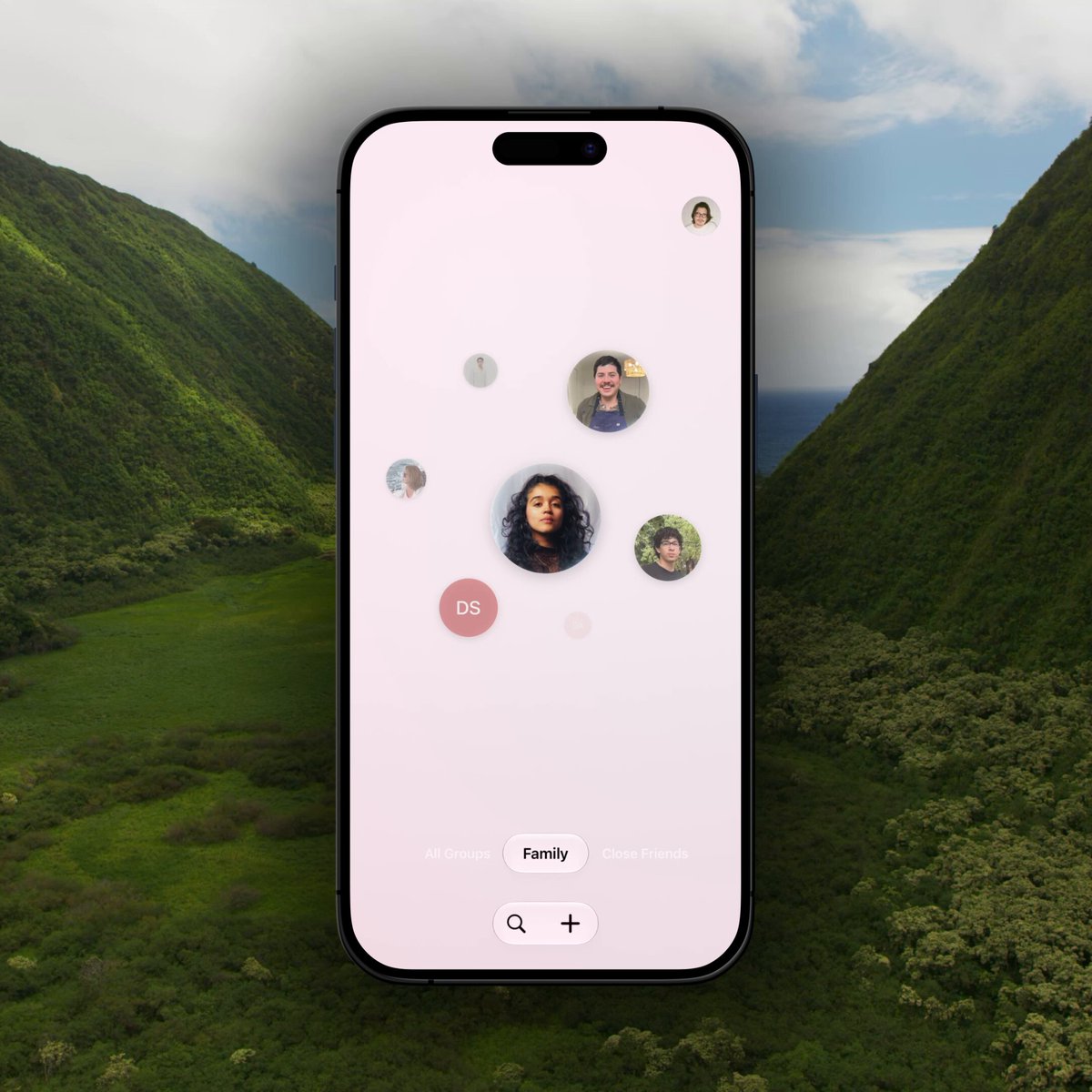
BUILD: Build a mobile contacts-group selector with a floating constellation of circular portrait buttons. Switching between two groups rearranges the portraits and changes their sizes, keeping one prominent contact near the center. Rebuild the interface only, not the phone mockup or landscape backdrop.
DESIGN SYSTEM: Use a narrow 390px-wide full-height surface with a pale blush #F8ECF2 background shifting toward lavender #EEEDF7 in the second group. Position the loose contact cluster in the upper-middle portion, leaving generous empty space below. Use roughly 7 portrait or initials circles, 28–92px diameter, with the largest near center and smaller ones surrounding it at irregular offsets. Add subtle soft shadows and circular image clipping. Use a clean sans-serif, 12–14px group labels and 16px utility icons. At the bottom center place a compact group label selector above a white pill containing search and plus buttons. A tiny profile circle sits at top right.
MOTION: On group change, interpolate each shared portrait's x/y position and scale over approximately 650ms with cubic-bezier(0.22,1,0.36,1). Fade outgoing contacts over 180ms and bring incoming ones in over 300ms with 35ms stagger. Transition the background tint over 500ms. Keep movement inside the cluster, without moving the bottom controls. These timings are reconstruction targets.
SECTIONS: Idle: an asymmetric family contact cluster. Alternate active group: a denser close-friends cluster with a different central portrait. Group controls show the selected label. Portraits are actionable buttons; search and add remain separate utilities.
IMPLEMENTATION: Use React and Motion with keyed contacts and fixed per-group normalized coordinates; animate transforms rather than running an expensive physics simulation. Use CSS circles for initials contacts and placeholder portraits for photos. Provide keyboard-operable group selection, meaningful contact labels, visible focus rings and 44px minimum interactive hit areas. With prefers-reduced-motion, replace spatial movement with a brief crossfade. Keep fewer than 12 animated contacts.
ADAPT TO THE PROJECT: Reuse existing tokens, components and fonts; map these colors to the nearest project tokens. Never copy logos, brand names, photos or illustrations from the original; use placeholders.
SUCCESS CHECK:
- Switching groups changes the cluster without shifting the bottom utilities.
- Portraits stay circular and never overlap the group selector.
- Keyboard and reduced-motion users can access both groups and every contact.