REFERENCE
- Gallery page: https://magpui.com/en/i/cinema-seat-picker-with-3d-seat-view-40fb43
- First frame (image): https://dnioievkvxejjbxgwvko.supabase.co/storage/v1/object/public/media/cinema-seat-picker-with-3d-seat-view-40fb43/shot.jpg
- Clip (mp4): https://dnioievkvxejjbxgwvko.supabase.co/storage/v1/object/public/media/cinema-seat-picker-with-3d-seat-view-40fb43/clip.mp4
- Original post: https://x.com/RaminNasibov/status/2119378104892211287 by @RaminNasibov
Before building, download the first frame and look at it. If ffmpeg is available, download the clip and extract frames (ffmpeg -i clip.mp4 -vf fps=2 frame-%02d.png), then study the motion frame by frame. Match what you see; the text below describes it, the frames are the truth.

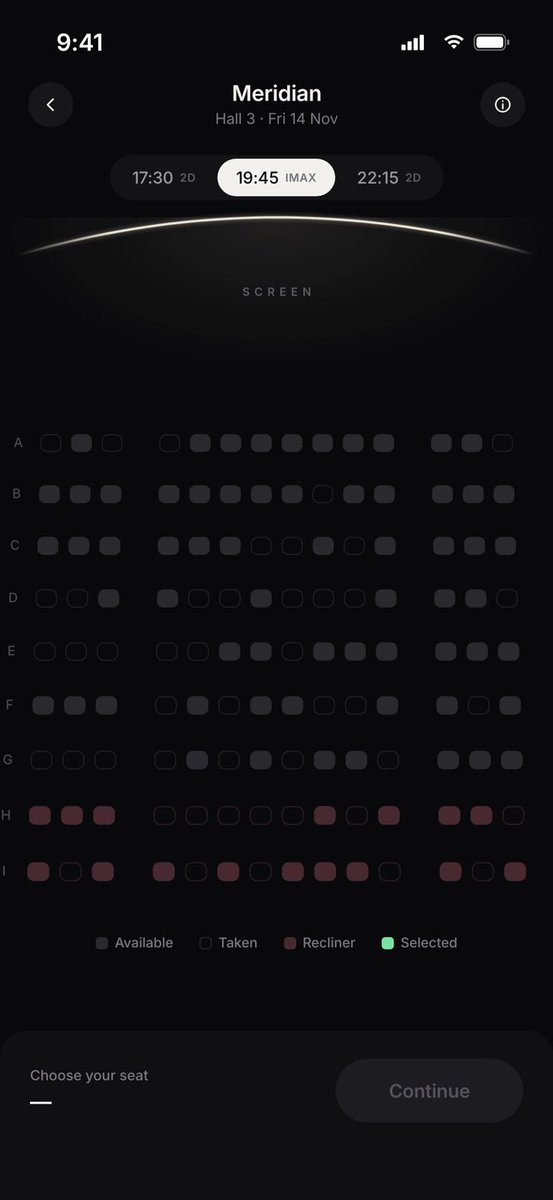
BUILD: A mobile cinema seat picker (390x844 viewport) where choosing a seat previews the real view from it. The first screen is a dark seat map under a glowing curved screen line; tapping a seat zooms the camera into a first-person 3D auditorium: rows of red velvet seats in the foreground and a huge wide screen showing a film still. A bottom sheet then shows the seat name, price and three stat tiles (distance to screen, field of view, offset from centre) with Change seat and Book buttons. It should feel cinematic and calm, like dimming the house lights.

DESIGN SYSTEM: Background #0B0B0C, surfaces #161618 with 1px borders rgba(255,255,255,0.06), radius 14px for tiles and 24px for the sheet. Clean geometric sans: title 17px/600 centered with a 12px muted subtitle (#8A8A8E); seat label 26px/600; stat values 20px/600 with 11px muted captions; tiny uppercase tracking 0.2em labels for SCREEN and UP CLOSE. Time pills (17:30, 19:45 IMAX, 22:15) in a segmented control, active pill white #F5F5F5 with black text. Seats are 18x14px rounded squares (radius 4px) on a 9-row grid with aisle gaps: available #3A3A3E, taken outline only, recliner rows tinted #6B2A35, selected mint #5EE2A0 with a tiny check. Primary CTA mint #6EE7A8 pill 52px tall with dark text; secondary outlined pill. 3D seats deep red #B3121F with darker backs, screen showing a warm sand-toned still.

MOTION: Seat tap: seat scales 1 -> 1.25 -> 1 over 260ms cubic-bezier(0.34,1.56,0.64,1) and turns mint; bottom bar slides up 24px and fades in 300ms cubic-bezier(0.22,1,0.36,1) with the seat and price. Continue or long-press: the map fades out 250ms while the 3D camera flies from a top-down overview to the eye position of that seat over 1400ms cubic-bezier(0.65,0,0.35,1), with a slight 4px vertical bob at the end. A pill 'View from B4' with a pulsing green dot fades in top center. The sheet rises from the bottom 420ms cubic-bezier(0.22,1,0.36,1), stat tiles stagger 60ms and their numbers count up 600ms. Change seat reverses the camera back to the map. Switching seats while in 3D lerps the camera between positions over 900ms.

SECTIONS: 1) Header: back button, title and hall/date subtitle, info button. 2) Time segmented control. 3) Curved screen arc with soft glow and SCREEN label. 4) Seat grid with row letters A to I on both sides and legend (Available, Taken, Recliner, Selected). 5) Bottom bar: 'Choose your seat' -> 'Row B, Seat 4  €12.50' with Continue (disabled until a seat is picked). 6) 3D view state: full-bleed auditorium render, top pill, bottom sheet with UP CLOSE label, mini seat map thumbnail, three stat tiles, Change seat and Book buttons.

IMPLEMENTATION: React with React Three Fiber: a simple procedural auditorium (instanced seat meshes on a stepped floor, a large plane screen textured with a placeholder still, soft emissive light from the screen and low ambient). Compute the camera position from row/column, aim at the screen centre, and derive distance, horizontal angle and field of view from that geometry so the stats are real. Animate the camera with a tweened lerp (or drei CameraControls setLookAt with transition). Seat map in DOM with Motion for the UI transitions. prefers-reduced-motion: cut directly to the seat view with a 200ms fade, no fly-through. Seats are buttons with aria-label 'Row B seat 4, available', arrow keys move focus on the grid. Cap DPR at 2, use instancing, pause rendering when the 3D view is hidden.

ADAPT TO THE PROJECT: Reuse the project's design tokens, fonts and button components, map colors to the closest existing tokens, and do not copy logos, brand names or film imagery from the original: use a placeholder landscape still on the screen.

SUCCESS CHECK:
- Picking different seats changes the 3D viewpoint and the distance/angle stats coherently (front rows closer and wider field of view).
- The camera fly-in is smooth at 60fps on a mid-range phone and Change seat returns to the map.
- With reduced motion enabled the view switches with a short fade and every seat is reachable by keyboard.