REFERENCE
- Gallery page: https://magpui.com/en/i/cards-open-into-immersive-scenes-176201
- First frame (image): https://dnioievkvxejjbxgwvko.supabase.co/storage/v1/object/public/media/cards-open-into-immersive-scenes-176201/shot.jpg
- Clip (mp4): https://dnioievkvxejjbxgwvko.supabase.co/storage/v1/object/public/media/cards-open-into-immersive-scenes-176201/clip.mp4
- Original post: https://x.com/AmirMushich/status/2114437778100691393 by @AmirMushich
Before building, download the first frame and look at it. If ffmpeg is available, download the clip and extract frames (ffmpeg -i clip.mp4 -vf fps=2 frame-%02d.png), then study the motion frame by frame. Match what you see; the text below describes it, the frames are the truth.

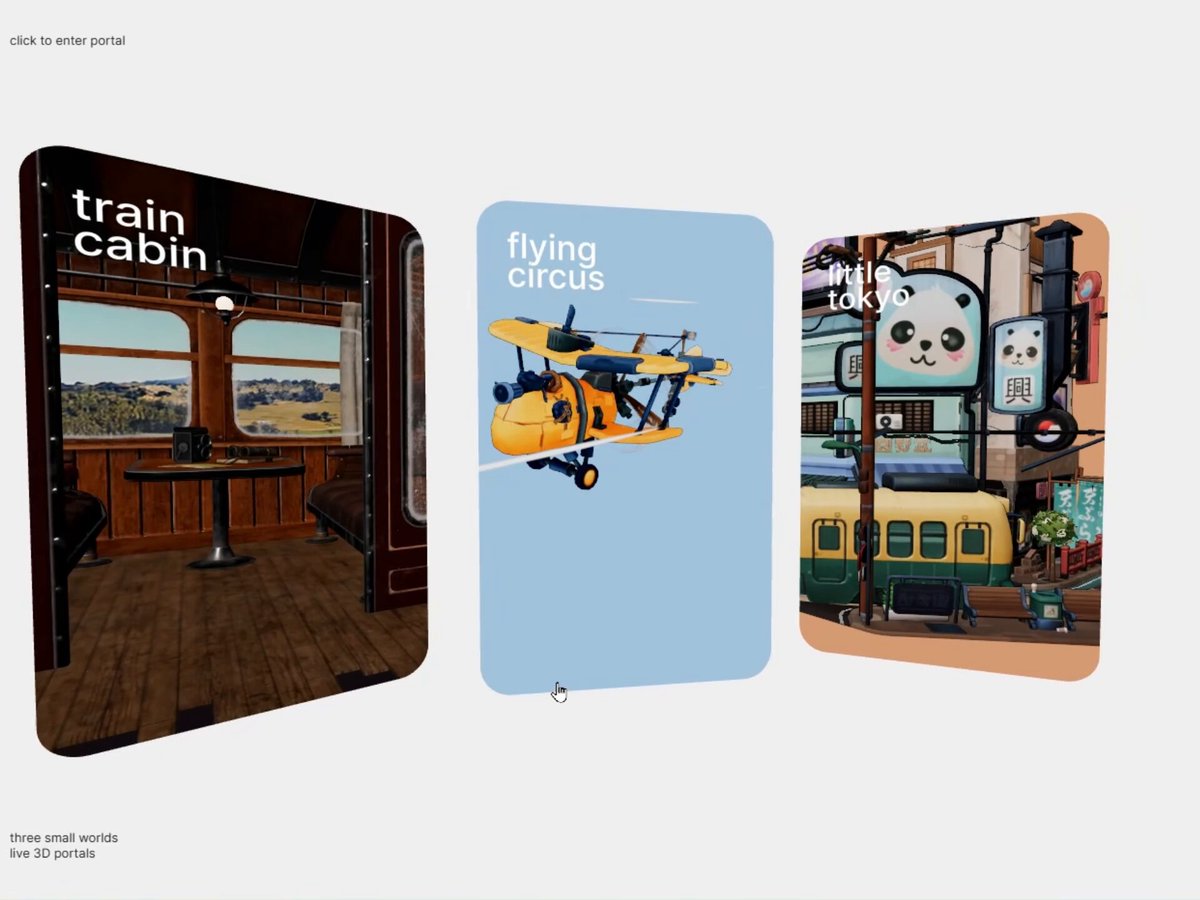
BUILD: Build a scene-selection component with three portrait cards on a white field. Selecting the train interior card should carry the viewer into its furnished 3D world, replacing the card gallery with a full-viewport cabin that can be explored through gentle camera movement. Other cards show a yellow aircraft against pale blue and a compact illustrated city storefront.
DESIGN SYSTEM: Use a near-white #F4F4F2 canvas, three approximately 220 by 320 px portrait cards with 20 px corners and 28 px gaps. Apply restrained perspective so the outer cards angle inward. Place small white sans-serif scene labels near each card's upper left, approximately 24 px, and tiny dark utility labels at viewport corners. The cabin uses dark walnut #49291C, burgundy upholstery #611D25, aged brass accents, cream curtains and a green countryside visible through broad windows. Include wood floorboards, overhead luggage racks, bench seats, lamps and a small central table with simple paper props.
MOTION: On hover, ease card tilt and scale toward the pointer over 280 ms with cubic-bezier(0.22,1,0.36,1). On selection, expand the selected render to fill the viewport while advancing the camera through the cabin doorway over approximately 1200 ms with cubic-bezier(0.65,0,0.35,1); fade the gallery labels over the first 200 ms. Continue with subtle 3D camera parallax around the table and windows, damped over 450 ms with cubic-bezier(0.22,1,0.36,1). These timings are implementation targets. On Back, restore the gallery over 800 ms with the same ease.
SECTIONS: Idle gallery with three labeled scene previews; hover and keyboard focus; selected-card transition; immersive cabin with a small Back control in the upper left; return to gallery. Preserve the original card order and focus.
IMPLEMENTATION: Use React Three Fiber and Three.js for a persistent scene and camera, rendering previews through scissored views or cached textures. Use GSAP for the camera and viewport transition so the preview and destination share the same geometry. Load detailed assets only on intent, compress textures, cap pixel ratio at 1.5 and pause rendering when hidden. Provide semantic buttons, visible focus rings and Escape to return. On touch, use restrained drag to look around without trapping page scroll. With prefers-reduced-motion, replace the travel with a short opacity crossfade and disable continuous parallax.
ADAPT TO THE PROJECT: Reuse existing tokens, components and fonts; map colors to the closest tokens. Never copy logos, brand names, photos or illustrations from the original; use placeholders and original or permissively licensed scene assets.
SUCCESS CHECK:
- Each scene card is keyboard selectable and Back restores its focus.
- Entering the cabin feels continuous, with no black frame or abrupt camera jump.
- The cabin remains responsive on mobile and reduced-motion removes the camera flight.