REFERENCE
- Gallery page: https://magpui.com/en/i/black-fog-sweep-card-reveal-4977f0
- First frame (image): https://dnioievkvxejjbxgwvko.supabase.co/storage/v1/object/public/media/black-fog-sweep-card-reveal-4977f0/shot.jpg
- Clip (mp4): https://dnioievkvxejjbxgwvko.supabase.co/storage/v1/object/public/media/black-fog-sweep-card-reveal-4977f0/clip.mp4
- Original post: https://x.com/60fpsdesign/status/2117660740240982252 by @60fpsdesign
Before building, download the first frame and look at it. If ffmpeg is available, download the clip and extract frames (ffmpeg -i clip.mp4 -vf fps=2 frame-%02d.png), then study the motion frame by frame. Match what you see; the text below describes it, the frames are the truth.

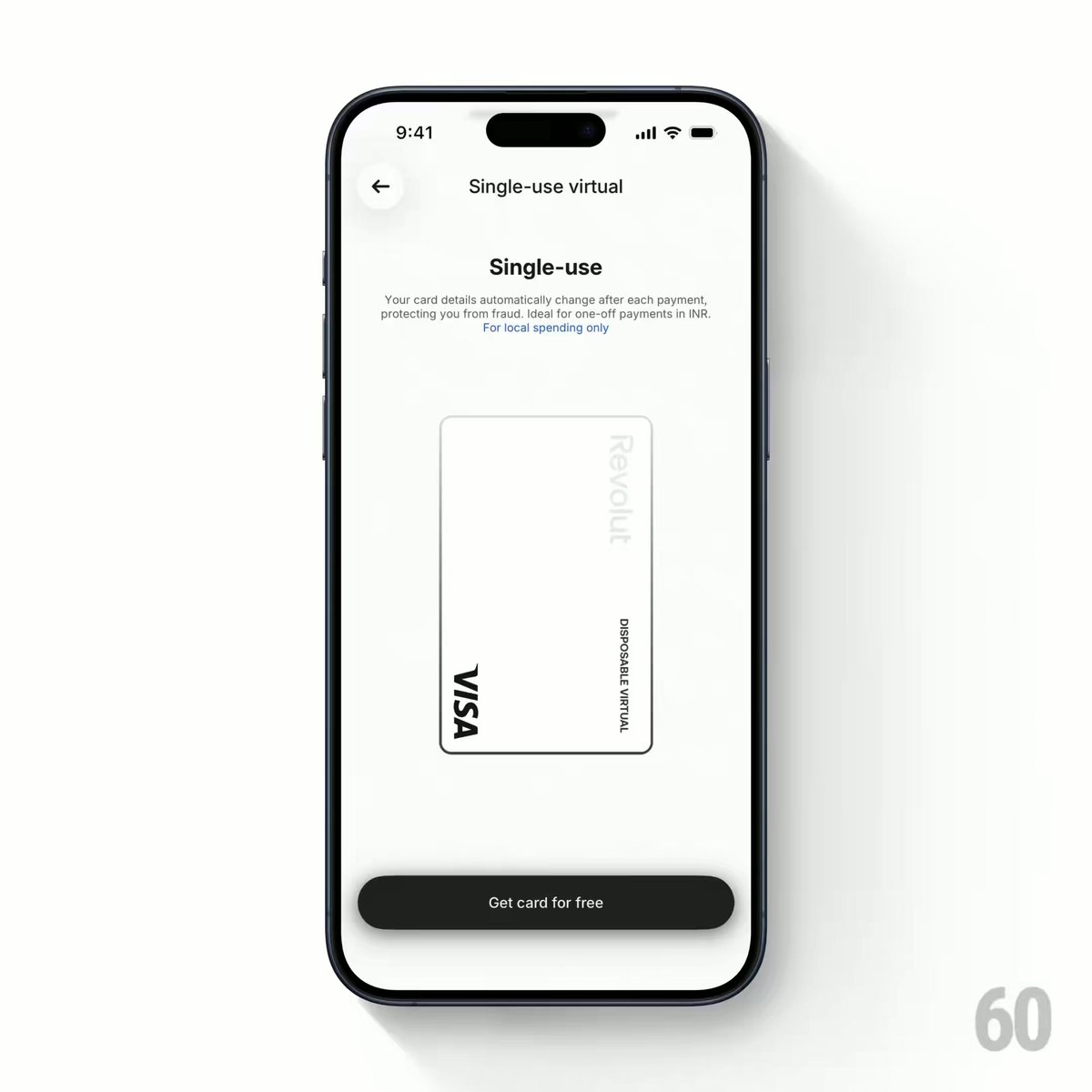
BUILD: A mobile screen component for a single-use virtual card. The screen is white and minimal: a back button, a small centered header, a bold title, two lines of gray helper text, a vertical white card (rounded, thin gray outline, card network mark in the bottom-left corner, a faint wordmark top-right) and a full-width dark pill button at the bottom. When the card regenerates (on load, on button press or after a payment), a soft black fog band sweeps up through the whole screen. As the band passes over the card, the card turns into its dark glossy version (graphite gradient with a white wordmark), then the band keeps rising, briefly darkens the header and fades out past the top, leaving the white card again. It should feel cinematic and quiet, like a light sweep in a film title.

DESIGN SYSTEM: Phone frame 390x844. Background #FFFFFF. Header 15px sans semibold #111 centered, back button 32px circle. Title 20px semibold #111; helper text 11-12px/1.4 #8A8A8A, max width 280px, centered. Card: 150x230px, radius 12px, fill #FFFFFF, 1px border #E3E3E3, very soft shadow 0 8px 24px rgba(0,0,0,0.06); dark face: linear-gradient(160deg, #6B6B6B 0%, #2A2A2A 55%, #111 100%) with a subtle top highlight, white wordmark rotated 90 degrees. Bottom button: height 44px, radius 22px, fill #1A1A1A, label 13px white. Fog: a full-width band about 45% of the screen tall, #000 core with heavily blurred edges (gradient from transparent to black to transparent, plus blur 40px), slightly elliptical so its edges curve.

MOTION: Trigger: card regenerate. Fog band translates from below the screen (translateY 110%) to above it (translateY -110%) over 2600ms, cubic-bezier(0.65, 0, 0.35, 1). Its opacity ramps 0 to 1 in the first 400ms and 1 to 0 in the last 500ms. The card face swap is masked by the band: the dark face is revealed only where the fog overlaps the card (use the same gradient mask), so the change wipes upward with it; after the band leaves, the card stays white with a short 200ms brightness flash at 1.04 then back to 1. The bottom button and header are covered and uncovered by the band in turn with no separate animation. Optional: the card scales 1 to 0.98 and back while the band is over it, 600ms ease-in-out.

SECTIONS: Parts: header with back button, title and helper text, virtual card (light face, dark face), fog band overlay, primary button. States: idle (white), regenerating (band sweeping, input disabled), done (white card, new details), reduced motion.

IMPLEMENTATION: React with Motion (or SwiftUI with a mask and offset animation for native). Put the fog as an absolutely positioned div with a vertical radial or linear gradient and filter blur over the screen with pointer-events none; animate its y. For the card swap, stack the light and dark faces and apply a CSS mask-image on the dark face whose position is tied to the same motion value as the fog, so they stay in sync. Announce 'New card details generated' in an aria-live region. prefers-reduced-motion: no sweep, cross-fade the card 200ms. Animate only transform and opacity; keep the blur static on the band to stay at 60fps on phones.

ADAPT TO THE PROJECT: Reuse the project's existing design tokens, components and fonts; map colors to the closest existing tokens. Never copy logos, brand names, card network marks or photos from the original; use placeholders.

SUCCESS CHECK:
- Pressing the button sends one soft black band from bottom to top in about 2.6 seconds, with blurred edges and no hard lines.
- The card shows its dark face only while the band covers it, wiping upward in sync.
- With prefers-reduced-motion on, the card simply cross-fades and the new details are announced.