REFERENCE
- Gallery page: https://magpui.com/en/i/ask-your-finances-ai-answer-panel-002433
- First frame (image): https://dnioievkvxejjbxgwvko.supabase.co/storage/v1/object/public/media/ask-your-finances-ai-answer-panel-002433/shot.jpg
- Clip (mp4): https://dnioievkvxejjbxgwvko.supabase.co/storage/v1/object/public/media/ask-your-finances-ai-answer-panel-002433/clip.mp4
- Original post: https://x.com/UiRahMan92/status/2117127937480962095 by @UiRahMan92
Before building, download the first frame and look at it. If ffmpeg is available, download the clip and extract frames (ffmpeg -i clip.mp4 -vf fps=2 frame-%02d.png), then study the motion frame by frame. Match what you see; the text below describes it, the frames are the truth.

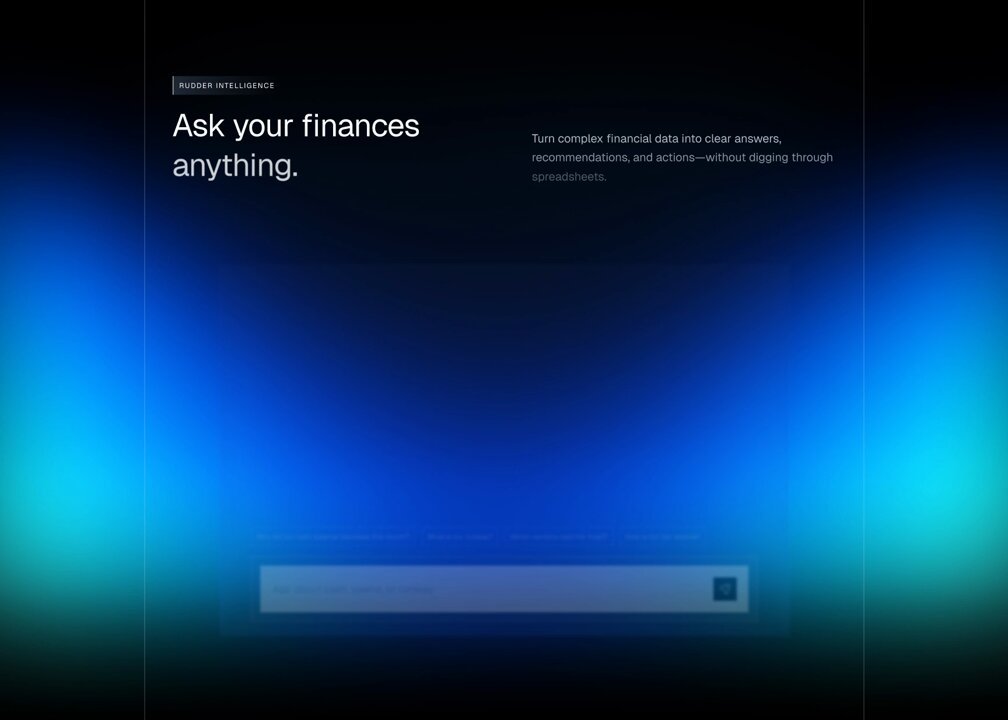
BUILD: A dark feature section that demos an AI finance assistant in a short, self-playing loop. A large glowing blue panel sits under a two-column heading. A question types itself into the input at the bottom, is sent, rises into the panel as a right-aligned white chat bubble, and then the assistant's answer streams in: one sentence of explanation followed by a row of three metric tiles whose percentages count up and whose segmented bar meters fill. It should feel calm, precise and premium, like a product film rather than a chat app.

DESIGN SYSTEM: Page background #000000 with thin vertical and horizontal hairlines (#FFFFFF at 8%) framing a centered 1040px column. Behind the panel, a soft radial glow: core #1E4BFF, mid #0A8CFF, edge cyan #19E3E3 fading to black, blurred 120-160px, extending past the panel left and right. Header row: small eyebrow tag (11px uppercase, letter-spacing 0.12em, 1px border #FFFFFF at 25%, 4px 8px padding); headline in a neo-grotesk sans, 44-48px, weight 400, white, line-height 1.1; supporting copy on the right, 14px, #FFFFFF at 70%, max 320px wide. Panel: 720x420px, background linear-gradient(180deg, #1B3FD6 0%, #1236B8 100%) at about 85% opacity, 1px border #FFFFFF at 12%, radius 2px, inner padding 32px. Assistant row: 28px white square avatar with a dark glyph, name 14px white. Answer text 14px, #FFFFFF at 85%. Metric tiles: three equal columns inside a 1px #FFFFFF at 18% bordered box, label 12px at 70%, value 24px white, meter = 1px-bordered bar filled with thin 2px vertical ticks. Footnote 11px at 55%, right-aligned link 'Explore drivers' with an arrow. Suggestion chips above the input: 11px, 1px border #FFFFFF at 25%, padding 4px 8px. Input: white #FFFFFF bar 48px tall, placeholder #8A8F99 14px, black 32px square send button with a paper-plane icon.

MOTION: Loop of about 14s. 0-600ms: heading words fade and rise 8px, stagger 60ms, cubic-bezier(0.22, 1, 0.36, 1). 600-1400ms: panel fades in and scales 0.98 to 1, glow opacity 0 to 1 over 1200ms. 1600-4200ms: question types into the input at about 35ms per character with a blinking 1px caret (530ms blink). 4400ms: send button press (scale 0.92 then 1, 160ms); the text leaves the input and a white bubble appears near the input, then travels up to the top-right of the panel over 700ms, cubic-bezier(0.65, 0, 0.35, 1). 5400ms: assistant avatar and name fade in 250ms. 5700-7600ms: answer text streams word by word (about 45ms per word) with a soft left-to-right opacity mask. 7800ms: tiles fade up 6px, stagger 120ms; values count up from 0 over 900ms ease-out; bar ticks fill left to right over 900ms in 2px steps. 9000ms: footnote and link fade in. Hold until about 13s, then crossfade the panel content out over 500ms and restart.

SECTIONS: Parts: header (eyebrow, headline, supporting copy), glow, answer panel (question bubble, assistant identity, answer text, metric tiles with meters, footnote + link), suggestion chips, input bar with send button. States: idle/empty, typing, sending, streaming answer, answer complete; chips hover (border to 60%, text to white, 150ms); send button hover (background #1A1A1A) and focus ring.

IMPLEMENTATION: React with Motion (Framer Motion) timelines driven by a small state machine (useAnimate or sequenced variants); CSS for the glow (stacked blurred radial gradients) so no canvas is needed. Typewriter and word streaming via a timed string slice, number count-up via an animated motion value, meter ticks as a repeating-linear-gradient whose width animates. Start the loop only when the section enters the viewport (IntersectionObserver) and pause offscreen. If the user focuses or types in the input, stop the demo and let them type for real. prefers-reduced-motion: show the final answer state statically with no typing, streaming or count-up. Keyboard: chips and input are reachable with Tab, Enter sends, visible focus rings in white at 60%.

ADAPT TO THE PROJECT: Reuse the project's existing design tokens, typography, buttons, inputs and icon set. Map the blues and cyan to the closest existing brand or accent tokens. Never copy the original product name, logo or copy: use placeholder assistant name, question and metrics.

SUCCESS CHECK:
- The loop plays in order: typing, bubble flies up, answer streams, tiles count up with filling meters, then restarts cleanly.
- The blue glow spills beyond the panel on both sides without banding, and text stays readable over it.
- With prefers-reduced-motion the section shows the finished answer immediately, and focusing the input stops the demo.