REFERENCE
- Gallery page: https://magpui.com/en/i/ascii-diagnostic-dashboards-080e2f
- First frame (image): https://dnioievkvxejjbxgwvko.supabase.co/storage/v1/object/public/media/ascii-diagnostic-dashboards-080e2f/shot.jpg
- Clip (mp4): https://dnioievkvxejjbxgwvko.supabase.co/storage/v1/object/public/media/ascii-diagnostic-dashboards-080e2f/clip.mp4
- Original post: https://it.pinterest.com/pin/893331276107991814/ by @lay.the.designer
Before building, download the first frame and look at it. If ffmpeg is available, download the clip and extract frames (ffmpeg -i clip.mp4 -vf fps=2 frame-%02d.png), then study the motion frame by frame. Match what you see; the text below describes it, the frames are the truth.

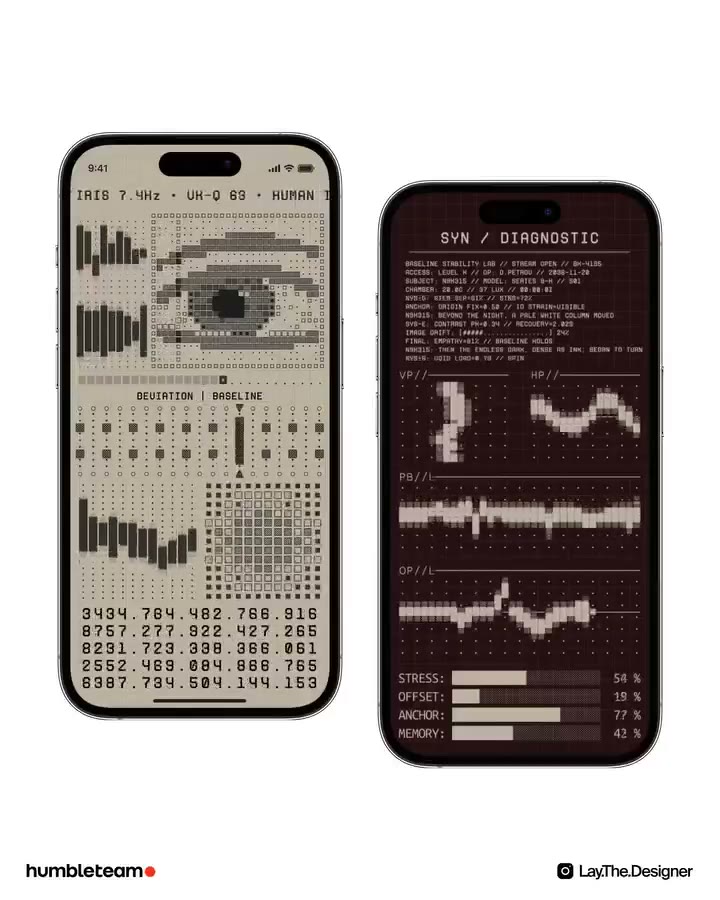
BUILD: Build a self-contained animated diagnostic display with two contrasting mobile-sized panels. One is a warm cream biometric console with a large ASCII eye; the other is a dark burgundy signal monitor with dense logs, waveforms and percentage bars. The effect should feel like a continuously running fictional instrument, not a real medical product. Rebuild only this display, not a landing page or promotional caption.

DESIGN SYSTEM: Use a white presentation surface and two portrait panels about 280px wide by 580px high, with the right panel offset down by about 50px and a 32px horizontal gap. Match the compact phone-like silhouettes with approximately 40px rounded corners, a thin dark rim and restrained edge highlights. Device chrome is optional framing. The light panel uses an estimated #D1C8AD background and #39392C glyphs; the dark panel uses #251014 with #C6B6A8 glyphs and faint #41292B grid lines. Use a narrow monospaced face, 9-11px technical labels and 13-16px tabular numerals, 1px separators, 8-12px panel padding and 12-18px section gaps. Build dense square character cells, not smooth high-resolution illustrations. On narrow containers stack the panels and remove the vertical offset.

MOTION: Start a continuous autonomous loop on mount while visible. These are implementation timing targets, not measured source timings: redraw procedural signals at 12-18fps, advance numeric telemetry every 120-200ms, and animate the eye's iris drift and eyelid compression over a roughly 5000ms loop using cubic-bezier(0.45,0,0.55,1). Use a roughly 700ms blink at an irregular 4000-6500ms interval with cubic-bezier(0.4,0,0.2,1). Scroll diagnostic traces horizontally at a constant rate, cubic-bezier(0,0,1,1), with distinct phase offsets for each trace. Let cream equalizer columns and dark percentage bars move between seeded target values over 600-1000ms, cubic-bezier(0.22,1,0.36,1), with 40ms stagger. Keep panel positions fixed: motion belongs inside the readouts, not in floating mockups.

SECTIONS: Light panel: a tiny status strip and uppercase telemetry header; upper-left stepped bar meters beside a large rectangular ASCII eye; a thin character divider; a centered baseline label over dotted vertical faders; lower-left uneven bar columns beside a square character matrix; and a dense five-row numerical table at the bottom. Dark panel: centered diagnostic heading with a thin underline; a compact block of faux technical log text; two small side-by-side dotted signal plots; two wider stacked waveform plots separated by small labels and rules; and four horizontal percentage bars with short labels and right-aligned values. Keep labels fictional and avoid copying source wording. Default state is running; provide a small accessible pause/resume control outside the art. Hover or focus must not be required to see the animation.

IMPLEMENTATION: Use semantic HTML and CSS for layout, headings, logs, controls and value bars. Use Canvas 2D for character-based eye and signal fields, drawing fixed-width glyphs onto a stable grid; derive the eye from ellipses and masks and traces from seeded sine/noise functions. No imported photos or video are necessary. A single requestAnimationFrame scheduler governs both canvases with a 12-18fps redraw cap; keep DOM telemetry updates at 5-8Hz. Limit each canvas to about 80 by 120 character cells, cap device pixel ratio at 2, pause offscreen with IntersectionObserver and when the tab is hidden, and cancel callbacks on unmount. Keep fake readouts separate from actual product metrics. Provide an accessible static textual summary instead of announcing every frame. Make pause/resume keyboard-operable with a visible 2px focus ring. With prefers-reduced-motion, show a stable representative eye and waveform arrangement and disable automatic number changes.

ADAPT TO THE PROJECT: Reuse the project's existing design tokens, components and fonts; map estimated colors to the closest existing tokens. Never copy logos, brand names, photos or illustrations from the original; use neutral labels and procedural placeholders. Preserve the warm light/dark signal contrast without replacing the project's design system.

SUCCESS CHECK:
- Both panels remain distinct: a recognizable character-built eye in the light view, separate signal plots and four percentage bars in the dark view.
- Signals, numeric tables and meters animate independently without moving the layout or rerendering every glyph through React each frame.
- At mobile width panels stack without horizontal overflow; keyboard pause/resume and reduced-motion mode both work.