Code cannot draw these well. Generate them with any image generator (hover the button to see a few), or with your agent's image tool if it has one, and save them in the project.
REFERENCE
- Gallery page: https://magpui.com/en/i/architect-portfolio-with-line-drawings-4e535f
- First frame (image): https://dnioievkvxejjbxgwvko.supabase.co/storage/v1/object/public/media/architect-portfolio-with-line-drawings-4e535f/shot.jpg
- Clip (mp4): https://dnioievkvxejjbxgwvko.supabase.co/storage/v1/object/public/media/architect-portfolio-with-line-drawings-4e535f/clip.mp4
- Original post: https://architecture-template.modulify.website by Modulify
Before building, download the first frame and look at it. If ffmpeg is available, download the clip and extract frames (ffmpeg -i clip.mp4 -vf fps=2 frame-%02d.png), then study the motion frame by frame. Match what you see; the text below describes it, the frames are the truth.

ASSETS
This needs real artwork, not shapes drawn in code. Use the files the user gives you (ask where they are). If you have an image generation tool, generate them with these prompts; otherwise leave clearly marked placeholders.
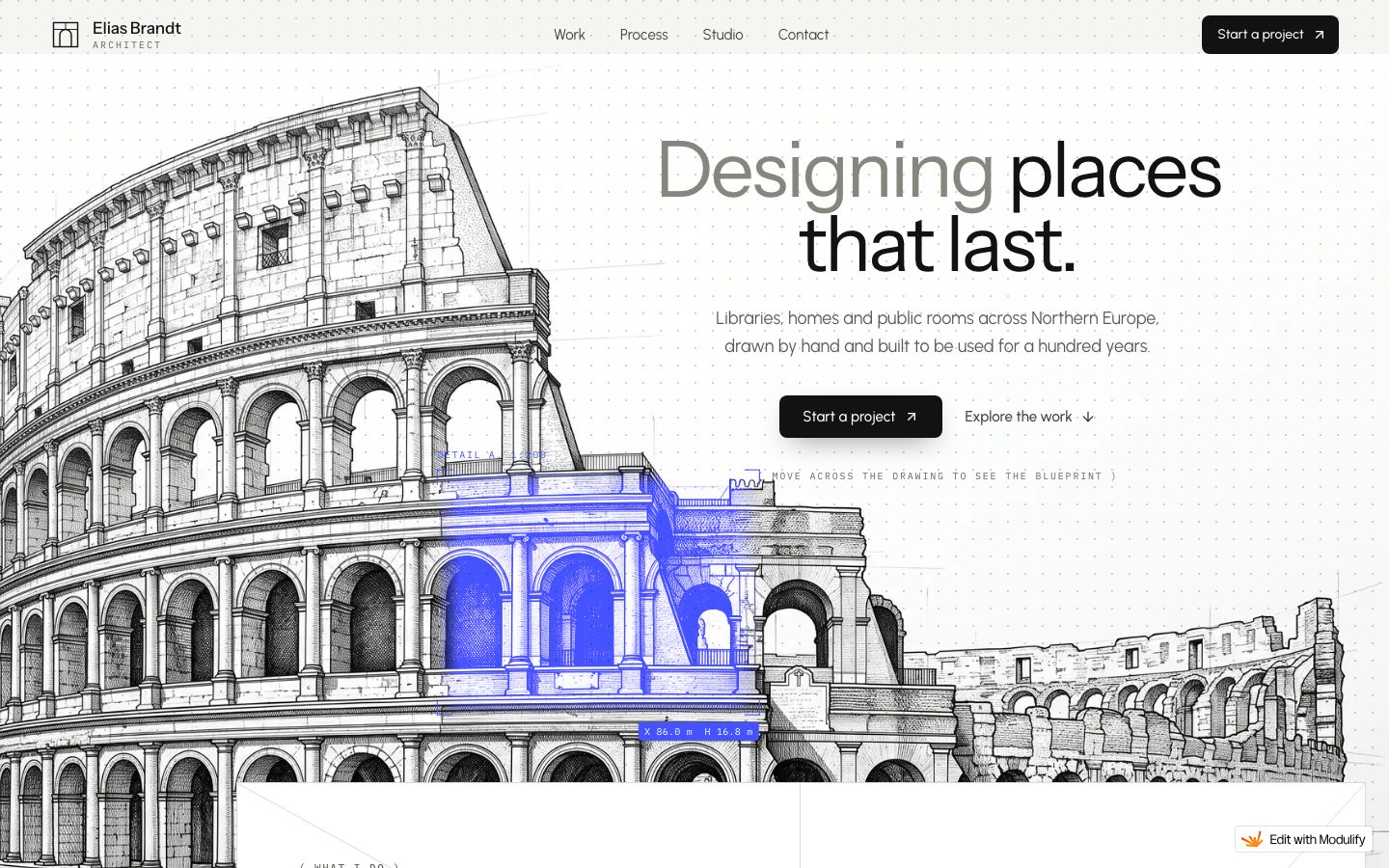
- Hero etching: Detailed black ink architectural line drawing of a classical stone arena facade in perspective, technical pen style, cross hatching, pure white background, no color, 4:3

BUILD
A complete architecture studio portfolio where the visual language is technical line drawing. The hero shows an etched drawing of a classical arena with one bay highlighted in electric blue; the work section is a horizontal skyline made of building outlines you can filter by type; the process section draws a building in four stages as you scroll.

DESIGN SYSTEM
- Background #F4F3EF, ink #1A1A1A, line art in graphite #2B2B2B at 1px, accent #3B4BFF.
- Type: clean grotesk, headlines 56-72px weight 400, tight tracking -0.02em; small mono labels 11px for stage numbers ('STAGE 01 / 05', scale '1:200').
- Cards: white #FFFFFF, 1px border #E4E2DC, radius 4px, no shadow except one soft lift on the services card.
- Filter chips: pill, 28px high, active #111 with white text.

MOTION
- Skyline: hovering a building outline fills it with #3B4BFF at 20% and shows a blue pill label above it; filtering fades non-matching outlines to 15% opacity in 300ms.
- Process: pinned section; each stage draws its SVG lines with stroke-dashoffset from full length to 0 over the scroll distance, while the stage text on the right swaps with a 400ms crossfade; a 5-step progress bar under the drawing fills in blue.
- Project cards slide in from 24px below, 700ms cubic-bezier(0.22, 1, 0.36, 1).

SECTIONS
1. Hero: line drawing left, headline 'Designing places that last.' right, two buttons.
2. Services: three cards with small line icons.
3. 'The skyline so far': filter chips + interactive skyline of building outlines.
4. Featured project: drawing left, title, place, year, area, status, prev/next.
5. 'From the first walk to the last brick': 5 process stages with self-drawing drawings.
6. Studio, contact, footer.

IMPLEMENTATION
- Inline SVG for the skyline and process drawings so lines can animate; GSAP ScrollTrigger to pin and scrub the stroke drawing.
- Hero etching can be a raster image; the blue highlight is a separate SVG overlay with mix-blend-mode multiply.
- prefers-reduced-motion: show every section in its final state, no scroll-driven movement.
- Visible focus rings on every link and button; all nav reachable by keyboard.
- Lazy-load images below the fold, animate only transform and opacity.

ADAPT TO THE PROJECT
Reuse the project's existing design tokens, components and fonts; map colors to the closest existing tokens. Never copy logos, brand names, photos or illustrations from the original: use placeholders or the generated images listed separately.

SUCCESS CHECK
- Hovering any building in the skyline highlights it and shows its name.
- Scrolling through the process draws each stage's lines from nothing to complete.
- The filter chips are real buttons with aria-pressed.Detailed black ink architectural line drawing of a classical stone arena facade in perspective, technical pen style, cross hatching, pure white background, no color, 4:3
Hit Copy prompt above, open your project in the agent and paste it. The prompt links the original frames, so the agent can look at them before building.
Put the two side by side. If something is off, tell the agent exactly what: timing, size, color or spacing.