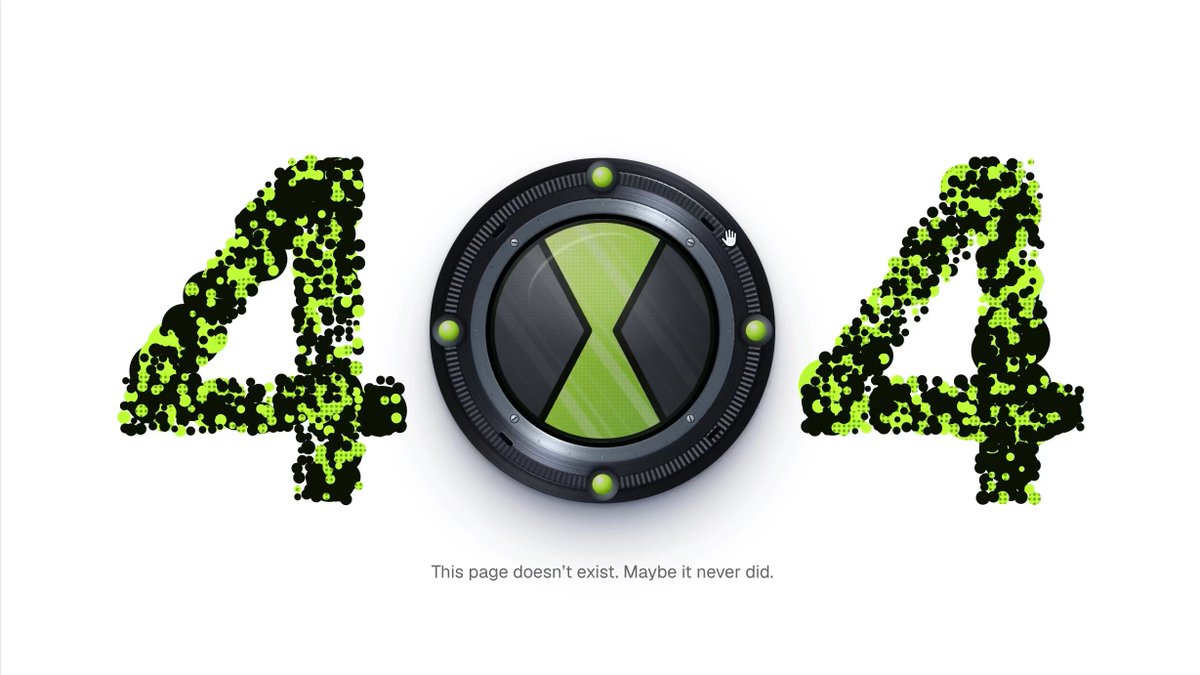
REFERENCE
- Gallery page: https://magpui.com/en/i/alien-watch-dial-404-page-14110d
- First frame (image): https://dnioievkvxejjbxgwvko.supabase.co/storage/v1/object/public/media/alien-watch-dial-404-page-14110d/shot.jpg
- Clip (mp4): https://dnioievkvxejjbxgwvko.supabase.co/storage/v1/object/public/media/alien-watch-dial-404-page-14110d/clip.mp4
- Original post: https://x.com/kshvbgde/status/2116148492259451028 by @kshvbgde
Before building, download the first frame and look at it. If ffmpeg is available, download the clip and extract frames (ffmpeg -i clip.mp4 -vf fps=2 frame-%02d.png), then study the motion frame by frame. Match what you see; the text below describes it, the frames are the truth.

BUILD
A playful 404 page. The number 404 is centered on a white page: the two 4s are drawn with hundreds of small lime-green and black particles, and the 0 is a chunky, glossy sci-fi wristwatch dial. Particles flee from the cursor and drift back into place. Clicking the dial makes it rotate and transform: the hourglass symbol in its face turns into a glowing diamond home icon with light rays around it, and clicking again takes the user home. A short line below: 'This page doesn't exist. Maybe it never did.' It should feel like a toy from a childhood cartoon.

DESIGN SYSTEM
- Page #FFFFFF, everything centered; the 404 group spans about 70% of the viewport width (max 900px), the dial about 1.15x the cap height of the 4s.
- The 4s: heavy rounded sans glyph, rasterized to a mask and filled with ~1,200 particles per glyph, 3-7px circles, mixed lime #A6E22E, bright green #7BD31B and near-black #121212 for a camo texture.
- Dial: outer bezel ring #2A2A2D to #5A5A60 metallic gradient with a thin top highlight, 4 small lime studs #B8F03A at 12, 3, 6 and 9 o'clock with a soft glow; inner face #1C1C1E with a lime hourglass symbol made of two triangles meeting at the center; drop shadow 0 12px 30px rgba(0,0,0,.35).
- Caption: 11px neutral sans #8A8A8A, 24px below the number.

MOTION
- Particles: each has a home position; within a 90px radius of the pointer, push away with force falling off by distance, then spring back home (stiffness .08, damping .85). On load the particles fly in from random positions to form the 4s over 900ms cubic-bezier(.16,1,.3,1), staggered 0-300ms.
- Click bursts: on click near a 4, a ring of particles blasts out 40-80px and returns in ~700ms.
- Dial transform on click: bezel rotates 90deg in 450ms cubic-bezier(.34,1.56,.64,1) (slight overshoot), the face pushes in (scale .94 then 1), the hourglass morphs into a lime diamond with a white house glyph inside (SVG path morph or crossfade with scale 0.6 to 1, 300ms), and a soft lime radial glow with 12 thin light rays fades in behind the dial (opacity 0 to .7, 400ms) and slowly rotates (20s per turn). Hover on the dial: studs brighten, scale 1.03.
- Optional sound: a short sci-fi 'activate' click on transform, muted by default with a small toggle.

SECTIONS
- Parts: left particle 4, dial button, right particle 4, caption.
- Dial states: idle (hourglass), hover (glow on studs), pressed (scale .94), active (home icon + rays; second click navigates to '/'), focus-visible (2px lime outline offset 4px).

IMPLEMENTATION
- Particles in one Canvas 2D (sample the glyph mask from an offscreen canvas with fillText, keep particle arrays in typed arrays), requestAnimationFrame, devicePixelRatio aware, cap ~3,000 particles.
- Dial as an SVG inside a real <button aria-label='Go to the home page'> animated with Motion; keyboard Enter/Space triggers the same transform.
- prefers-reduced-motion: particles static and no repulsion, the dial swaps state with a simple crossfade, no rotating rays.
- Keep a plain text link 'Back to home' for screen readers and no-JS.

ADAPT TO THE PROJECT
Reuse the project's existing design tokens, components and fonts; map the colors above to the closest existing tokens. Never copy logos, brand names, characters or illustrations from the original; draw an original sci-fi dial and use placeholders.

SUCCESS CHECK
- Moving the cursor through a 4 scatters its particles, which settle back into a crisp glyph within about a second.
- Clicking or pressing Enter on the dial turns it into a glowing home button, and a second activation navigates home.
- With prefers-reduced-motion on, the page shows a still 404 with a working home button.