REFERENCE
- Gallery page: https://magpui.com/en/i/activity-heatmap-with-project-breakdown-d3338a
- First frame (image): https://dnioievkvxejjbxgwvko.supabase.co/storage/v1/object/public/media/activity-heatmap-with-project-breakdown-d3338a/shot.jpg
- Clip (mp4): https://dnioievkvxejjbxgwvko.supabase.co/storage/v1/object/public/media/activity-heatmap-with-project-breakdown-d3338a/clip.mp4
- Original post: https://www.rareui.com/components/githubactivity by Rare UI
Before building, download the first frame and look at it. If ffmpeg is available, download the clip and extract frames (ffmpeg -i clip.mp4 -vf fps=2 frame-%02d.png), then study the motion frame by frame. Match what you see; the text below describes it, the frames are the truth.

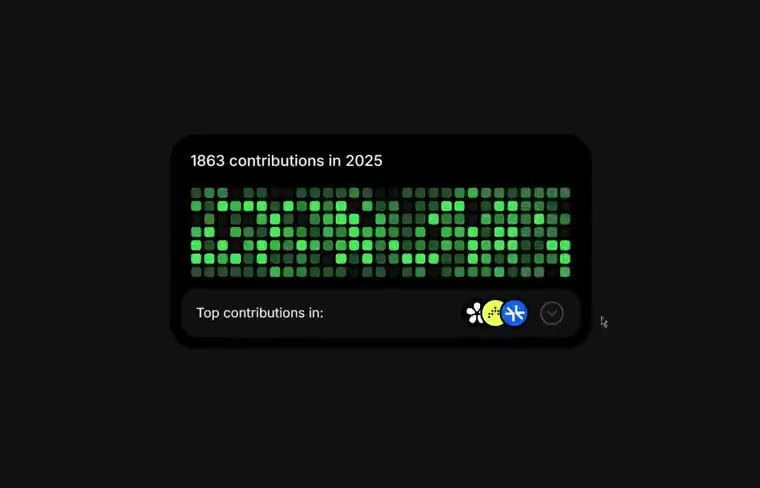
BUILD: Build a compact developer activity widget that switches between a yearly contribution heatmap and a three-row project breakdown, retaining a stable card footprint. This is a single reusable component, not a page.
DESIGN SYSTEM: Use a roughly 340 by 170px black card, 18px corners, dark charcoal inset footer and a subtle border. Use a neutral sans-serif at 12px for labels and 14px for the contribution count. Heatmap cells are approximately 7px square with 3px gaps, varying from #14291B through #246C37 to #4FE06C. Footer contains a small project caption, three overlapping colored circular placeholders and a circular toggle at right. List rows pair a small project icon and label with a right-aligned count. Maintain 14px internal padding.
MOTION: On footer toggle, crossfade the grid and list over 280ms while moving entering content up 8px; stagger list rows by 35ms. Use cubic-bezier(0.22,1,0.36,1). Keep the outer shell stationary. Reverse on the back control. Heatmap hover or keyboard focus reveals a compact pale tooltip above the target cell over 120ms with cubic-bezier(0.2,0,0,1). These timings are implementation targets.
SECTIONS: Heatmap state with yearly total, contribution cells and project footer; breakdown state with heading, back control and three ranked rows; hovered cell state with date and count tooltip.
IMPLEMENTATION: Use React and Motion for content transitions, CSS grid for heatmap cells and CSS for surfaces. Use deterministic sample data. Reduced motion removes movement and makes the content switch immediate. Use real buttons for toggles, visible focus rings and accessible labels. Provide a roving-tabindex heatmap or a concise accessible data summary instead of hundreds of tab stops. Limit animation to opacity and transforms.
ADAPT TO THE PROJECT: Reuse existing design tokens, components and fonts; map these colors to the closest existing tokens. Never copy logos, brand names, photos or illustrations from the original; use project-label and icon placeholders.
SUCCESS CHECK:
- Switching views never changes the widget footprint.
- Heatmap tooltips work with pointer and keyboard focus.
- Project rows remain legible with reduced motion enabled.